
Help
Account Groups
Organize your financial data with account groups, categories, and types.
Where to find it:AccountingAccount Groups
What an account group is
The Accounting menu opens once Advanced Accounting is switched on in Business Settings. Until then this page explains what it is for and shows an Enable Advanced Accounting button that takes you to the setting.
An account group is a heading that accounts are filed under, such as Bank Accounts, Sales Accounts or Indirect Expenses. Groups are what turn a long list of accounts into something you can read.
Each group has a Type and a Category. The type is the side of the books it sits on: Asset, Liability, Income, Expense or Capital. The category is a finer heading inside that type, picked from a fixed list, such as Current Assets or Duties and Taxes.
You start with a full set of default groups, so most businesses add a group only when they want a heading of their own.
Find your way round the list
Open Accounting in the sidebar and choose Account Groups. The default groups come first, then your own.
- 1Create New Account Group adds a group.
- 2A group with sub-groups has a + at the start of its row that opens them. The + in the heading row opens every group at once.
- 3Filter the list by Type or Category with the filter beside the column heading. There is no search box on this list.
- 4Edit on a row changes the group. More holds Edit again, and Delete where a group can be deleted.
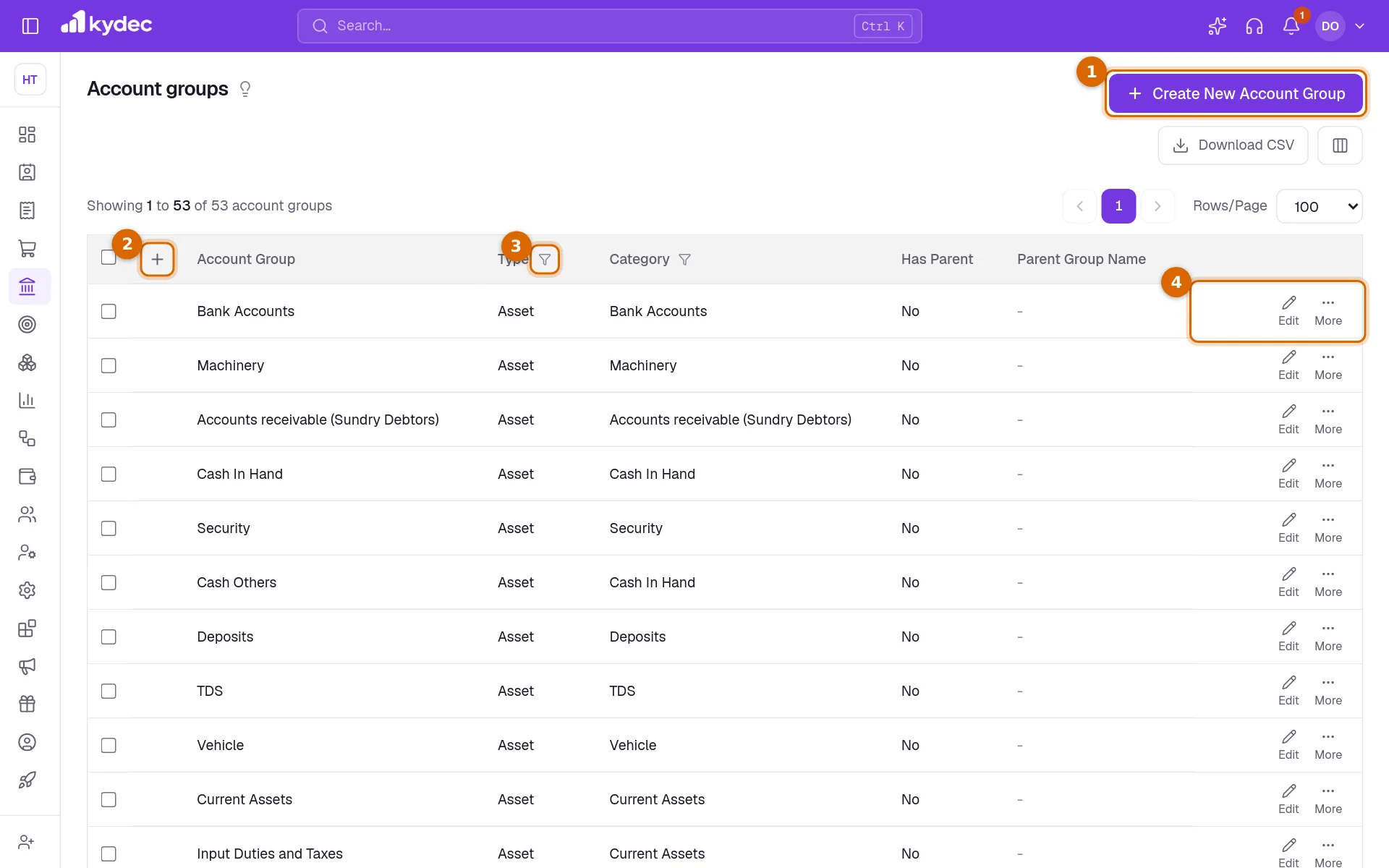
- Has Parent and Parent Group Name show where a sub-group sits.
- Download CSV saves the list as a file. The columns button beside it (Show/Hide Columns) can add Is Default and Created By.
Create a group
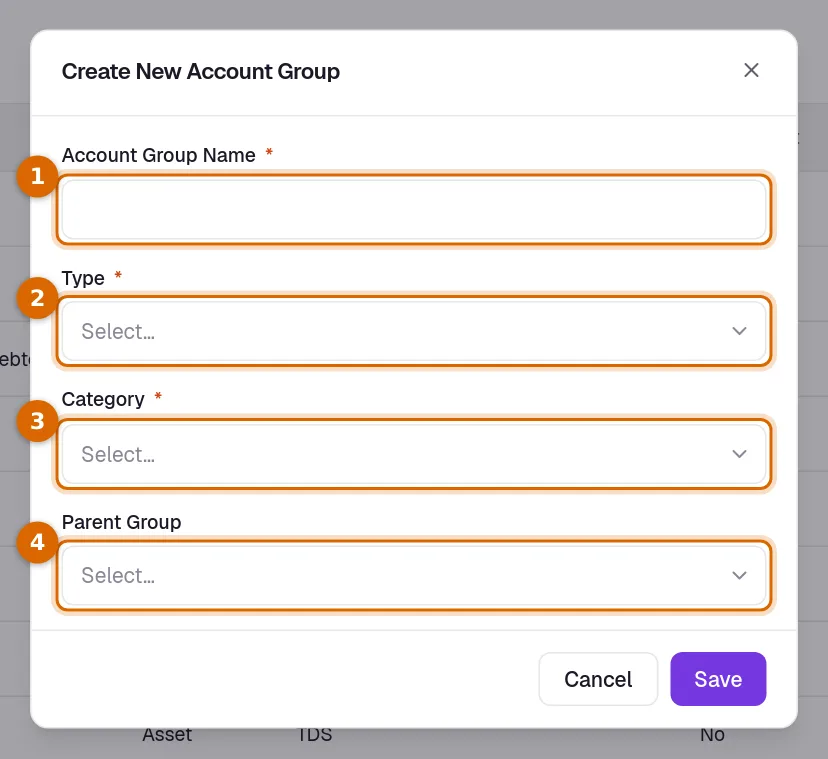
- 1Click Create New Account Group and enter the Account Group Name. Two groups cannot share a name.
- 2Choose the Type.
- 3Choose the Category. Only the categories that belong to the chosen type are offered.
- 4To make it a sub-group, choose a Parent Group. Only groups of the same type and category are offered. Leave it empty, or choose None — top-level group, for a group that stands on its own.
- 5Click Save.
Good to know. You can also create a group without leaving the account form: in Account Group, type a name that is not in the list and choose Create New - ….
Change or delete a group
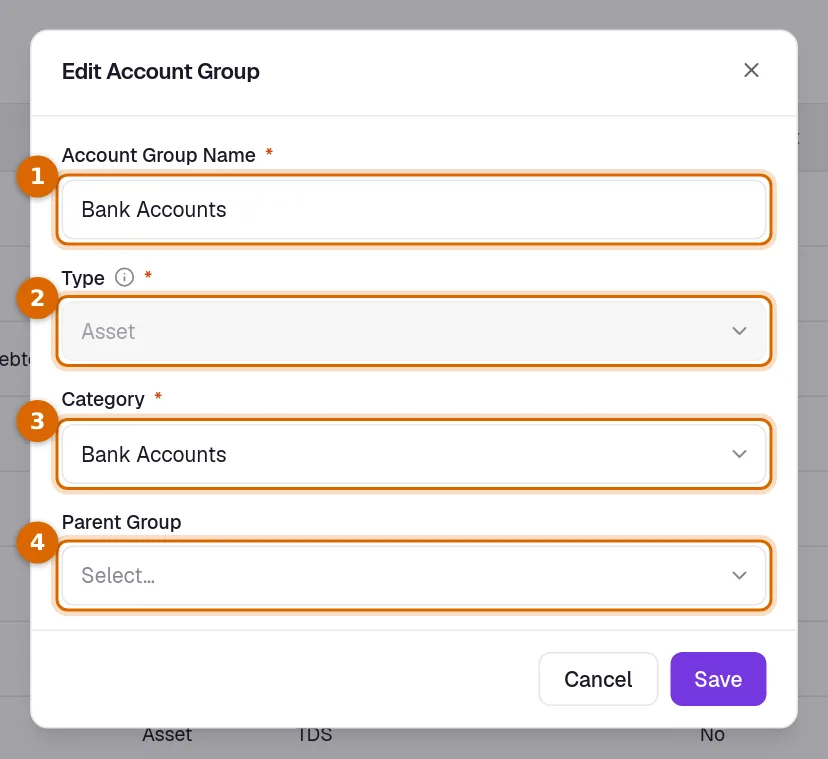
- 1Click Edit on the row. The Account Group Name can be changed at any time.
- 2Type is locked. It cannot be changed once the group exists.
- 3Category can be changed, unless the group has sub-groups. Move those to another group first.
- 4Parent Group moves the group under another one of the same category. The group itself and its own sub-groups are listed as (Would create a cycle) and cannot be picked.
- Delete appears in the More menu only for a group you created that has no accounts and no sub-groups under it.
Good to know. Default groups cannot be deleted. A group with accounts filed under it cannot be deleted either: move the accounts to another group first.
How groups are used
- An account takes its type and category from its group, so moving an account to another group changes how it is classified.
- The Chart of Accounts can be filtered by Account Group Name, Category and Type.
- When KyDec creates an account for you, it files it by category: a bank account under Bank Accounts, a cash account under Cash In Hand, a client under Accounts receivable (Sundry Debtors) and a vendor under Accounts Payable (Sundry Creditors).
- When closing balances are carried into a new financial year, only accounts in Asset, Liability and Capital groups carry forward. Income and Expense start each year afresh.
Common questions
- Do I need to create groups before I start?
- No. The default groups are created when Advanced Accounting is switched on, and KyDec files its own accounts under them. Add a group only when you want a heading the defaults do not give you.
- Can I change the type of a group?
- No. The type is fixed when the group is created. Create a new group with the right type, then edit each account and choose the new group under Account Group.
- Why is there no Delete on a group?
- It is a default group, or it still has accounts or sub-groups under it.
Related guides
Accounts (Ledgers)
Create accounts, view ledger entries, and track all your financial transactions in one place.
Voucher Books
Group your voucher entries into books by type, and see how many entries each book holds in a financial year.
Advanced accounting
Manual ledgers and voucher entries, plus the back-fills that populate them: carry closing balances into a new financial year, and generate vouchers for documents you have already raised.