Help
Balance Sheet
What the business owns and owes on a date, with an earlier date beside it and the entries behind every figure.
Where to find it:AccountingBalance Sheet
What the balance sheet shows
The Accounting menu opens once Advanced Accounting is switched on in Business Settings, which is part of a paid plan. Until then this page explains what it is for and shows an Enable Advanced Accounting button that takes you to the setting.
A balance sheet sets what your business owns (its assets) against what it owes (its liabilities) and what is left for the owners (its capital, also called equity). The two sides always come to the same total.
KyDec builds it from the balances of your accounts: the opening balances you entered and every voucher entry posted since. You do not type anything on this page.
Good to know. Opening the balance sheet needs a role with View financial statements.
Find your way round
Open Accounting in the sidebar and choose Balance Sheet. It opens on the current financial year, in Vertical View.
- 1The tabs change the layout. Vertical View lists the assets, then the liabilities and equities under them. Horizontal View puts the two sides next to each other, each with its total at the foot. Schedule III View is the layout an accountant files, covered further down.
- 2Select Financial Year sets the year. The sheet shows what every account held at the end of that year.
- 3Summary holds four headline figures. Click the heading to fold it away.
- 4Download As saves the sheet as a file.
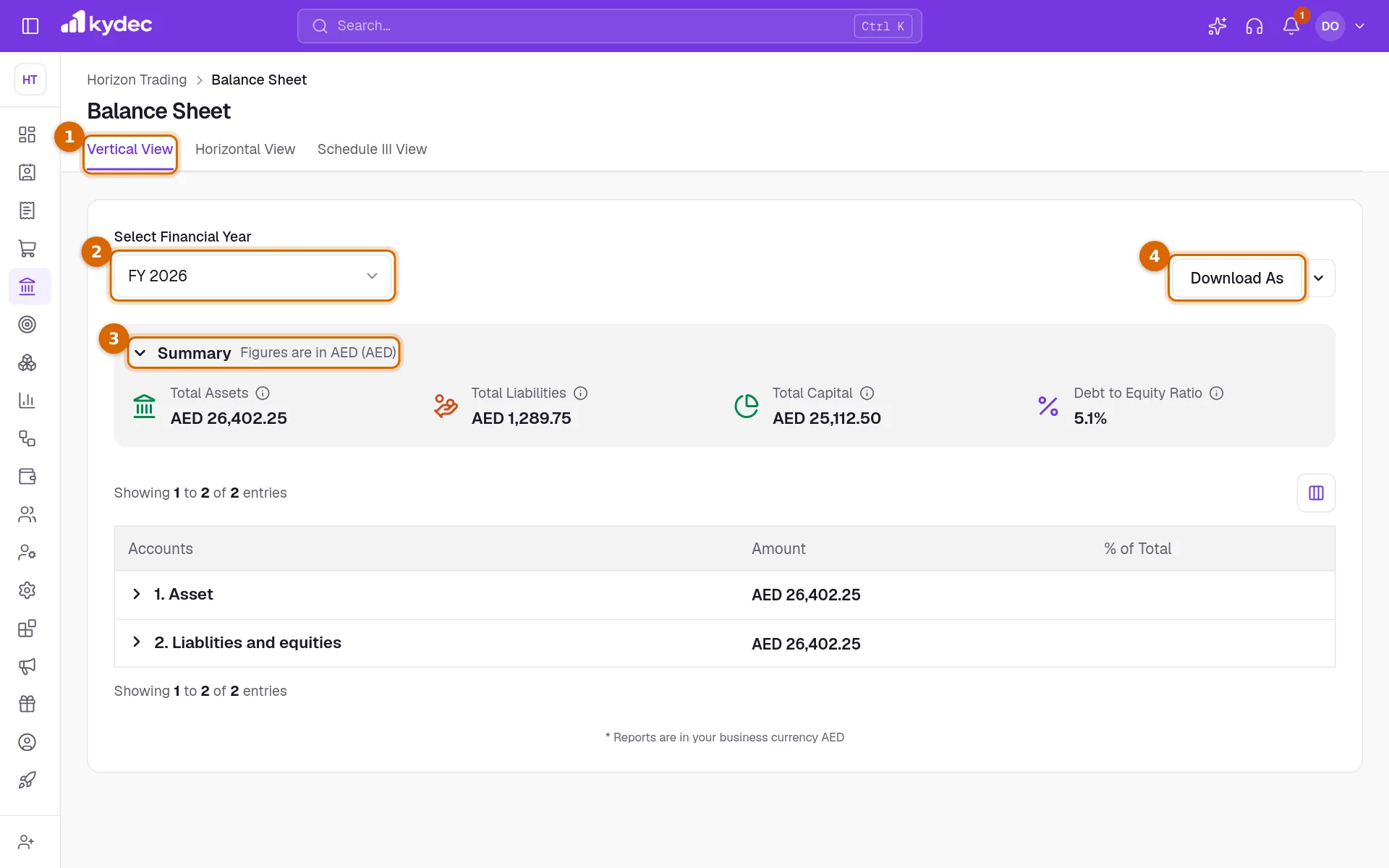
- Total Assets is everything the business owns, current and non-current.
- Total Liabilities is what the business owes to others.
- Total Capital is the total of your capital accounts, including the profit of this year and of earlier years.
- Debt to Equity Ratio is Total Liabilities divided by Total Capital, as a percentage. It shows a dash when the capital is zero.
- Every figure is in your business currency. A negative amount is shown in brackets.
Open the accounts behind a figure
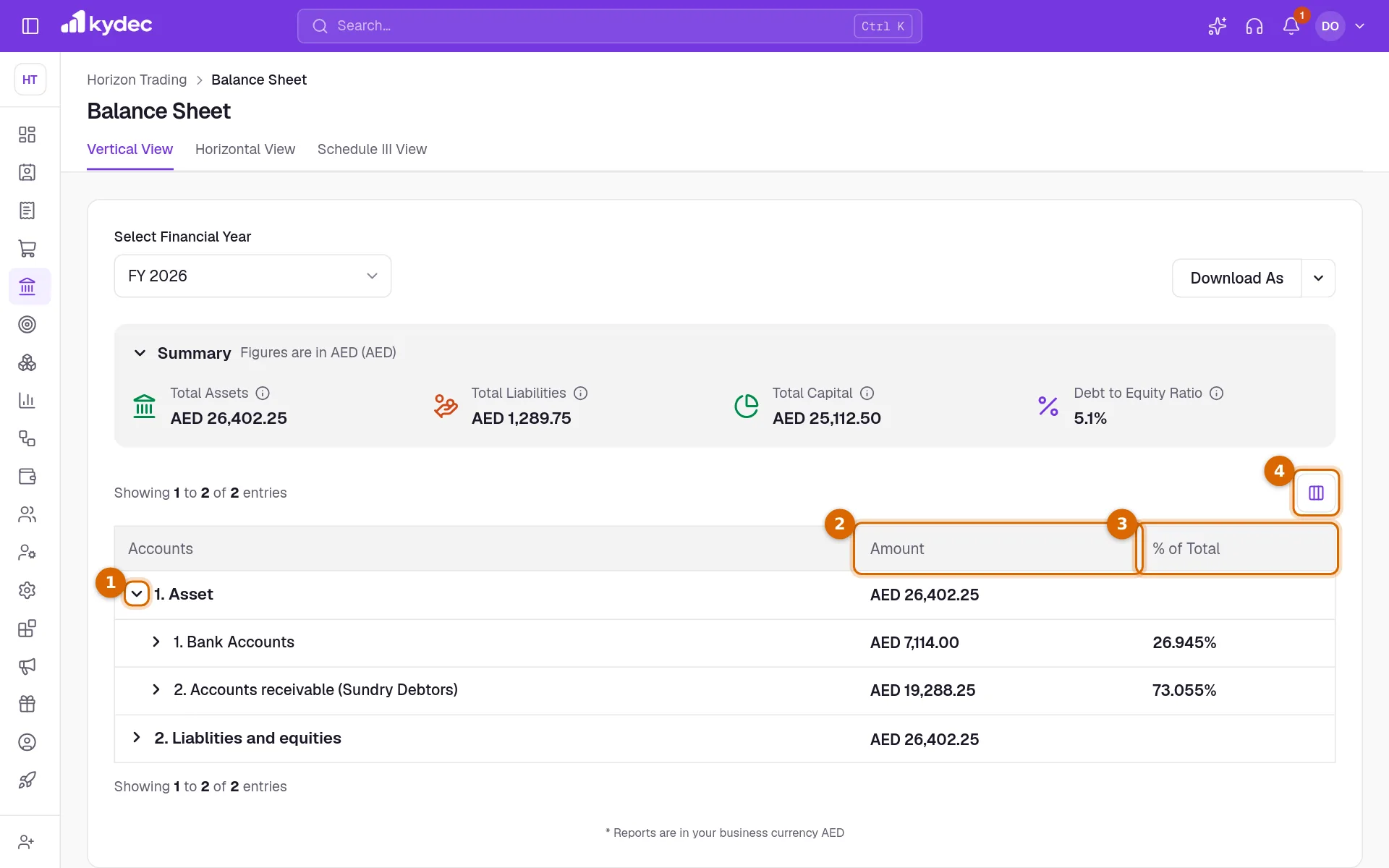
- 1Click the arrow beside a row to open it. Asset opens into its categories, then the account groups, then the accounts.
- 2Amount is the balance at the end of the year.
- 3% of Total is the share a row takes of the row it sits under.
- 4The columns button above the table (Show/Hide Columns) chooses which of Accounts, Amount and % of Total show. It is offered in Vertical View.
- Click the name of an account to open its statement: every entry behind the balance.
- Rows are numbered within the row they belong to. Groups and accounts with nothing in them are left out.
- Three rows are worked out by KyDec and have no statement behind them. Current Year Earnings is this year's income less its expenses. Retained Earnings is the same for every earlier year. Opening Balance Adjustments holds the difference when the opening balances typed on your accounts do not balance.
The Schedule III view
Schedule III View lays the sheet out the way it is filed: EQUITY AND LIABILITIES above ASSETS, each split into current and non-current, with last year beside this year. Current means due or usable within a year.
- 1As on sets the date. It opens on today. The second column is the same day one year earlier.
- 2Tick Show negative balances on the other side to move a balance that sits on the wrong side of the sheet. A client who has paid in advance moves to Other Current Liabilities, a supplier you have paid in advance to Short-term Loans and Advances, and an overdrawn bank account to Short-term Borrowings.
- 3Download As saves this view with both columns.
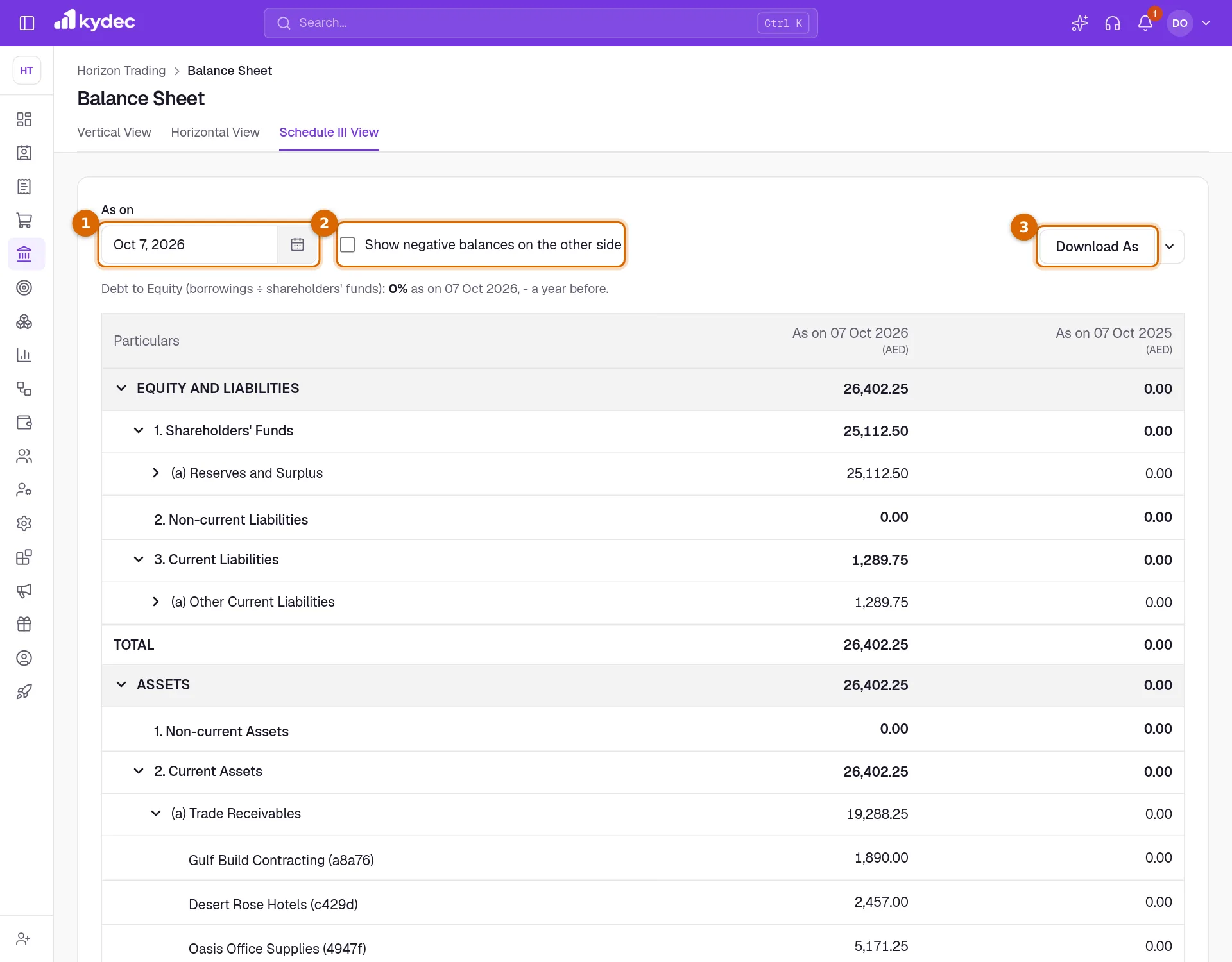
- The two sides and their headings start open. Click the arrow beside a line such as Trade Receivables to list the accounts in it.
- Click a figure beside an account to open its statement from the start of that column's financial year to the column's date. Those are the entries behind the figure.
- Income and expense accounts are not listed. What they come to is shown under Reserves and Surplus, as Retained Earnings and Current Year Earnings.
- An account is put on a line by the account group it is filed under. One in a group KyDec does not recognise goes to Other Current Assets, Other Current Liabilities or Share Capital, by its type.
- The Debt to Equity line above the table is worked out differently here: borrowings divided by shareholders' funds, for each of the two dates.
Good to know. Ticking the box only changes how the sheet is shown. Nothing is posted to your books.
What the sheet does not work out for you
- The sheet reads only what has been posted to your accounts. The stock you count under Products & Inventory is not valued into it, so there is no automatic closing stock figure. Inventories shows only what has been posted to a stock account.
- Depreciation is not calculated. Post it yourself as an entry in a voucher book.
- Balances held in another currency are not revalued at the year end. An exchange gain or loss is posted only when a payment settles a document at a different rate.
- Invoices, purchases and payments reach your books through Sync Documents in Business Settings. A document type that has not been synced is not in the sheet, and drafts and cancelled documents are never posted.
Download the sheet
- Click Download As for Excel, or use the arrow beside it to choose Excel or PDF.
- Excel saves a CSV file, which opens in any spreadsheet.
- PDF opens your browser's print window, where you choose to save as a PDF. If nothing opens, allow pop-ups for KyDec.
- Both hold every row of the sheet, whether it is open on screen or not.
- Vertical View and Horizontal View download the same sheet for the financial year. Schedule III View downloads its own layout, with both dates.
Common questions
- Can I see the balance sheet on any date, not only at the year end?
- Yes. Open Schedule III View and pick the date under As on. Vertical View and Horizontal View always show the end of the financial year you choose.
- Why is there a row called Opening Balance Adjustments?
- The opening balances typed on your accounts do not balance: the debits and the credits are not equal. KyDec puts the difference in this row so the two sides still agree. Correct the opening balances in Chart of Accounts and the row goes away.
- Where is my closing stock?
- It is not worked out for you. The stock under Products & Inventory is not valued into the balance sheet; only amounts posted to a stock account appear. Post the value as an entry in a voucher book if you need it on the sheet.
- Why is Debt to Equity different in the Schedule III view?
- The two are worked out differently. Debt to Equity Ratio in the Summary divides all liabilities by the capital. The Schedule III view divides borrowings only by shareholders' funds.
Related guides
Trial Balance and Profit & Loss
Check that your books balance, and see income against expenses for a period in the Profit & Loss and the Income Statement.
Accounts (Ledgers)
Create accounts, view ledger entries, and track all your financial transactions in one place.
Sync Accounting Documents & Payment Records
System will automatically create ledger accounts & vouchers, and pass journal entries for all the synced documents.
Advanced accounting
Manual ledgers and voucher entries, plus the back-fills that populate them: carry closing balances into a new financial year, and generate vouchers for documents you have already raised.