
Help
Trial Balance and Profit & Loss
Check that your books balance, and see income against expenses for a period in the Profit & Loss and the Income Statement.
Where to find it:AccountingTrial Balance
Three statements, and what each is for
The Accounting menu opens once Advanced Accounting is switched on in Business Settings, which is part of a paid plan. Until then each of these pages explains what it is for and shows an Enable Advanced Accounting button that takes you to the setting.
All three are built from the entries in your books. Every entry has two sides of the same amount, a debit and a credit. Income is what you earned and expense is what you spent.
- Trial Balance lists every account with what it opened with, what was debited and credited to it, and where it closed. Use it to check your books before you close a period.
- Profit & Loss shows your income and expenses over any period and the profit they leave, and can put several periods side by side.
- Income Statement shows the same income and expenses for one whole financial year, account by account.
Good to know. Opening any of the three needs a role with View financial statements.
Read the trial balance
Open Accounting in the sidebar and choose Trial Balance. It opens on the whole of the current financial year.
- 1Select Financial Year chooses the year. The dates beside it reset to the whole of that year.
- 2Select Dates narrows the report to the dates you pick.
- 3Click Apply. The year and the dates count only once you do.
- 4Hide Zero-Entry Accounts is ticked to start. It leaves out accounts that opened at nothing and had nothing posted. Untick it to list every account.
- 5Download PDF saves the report. Download Excel is under the arrow beside it.
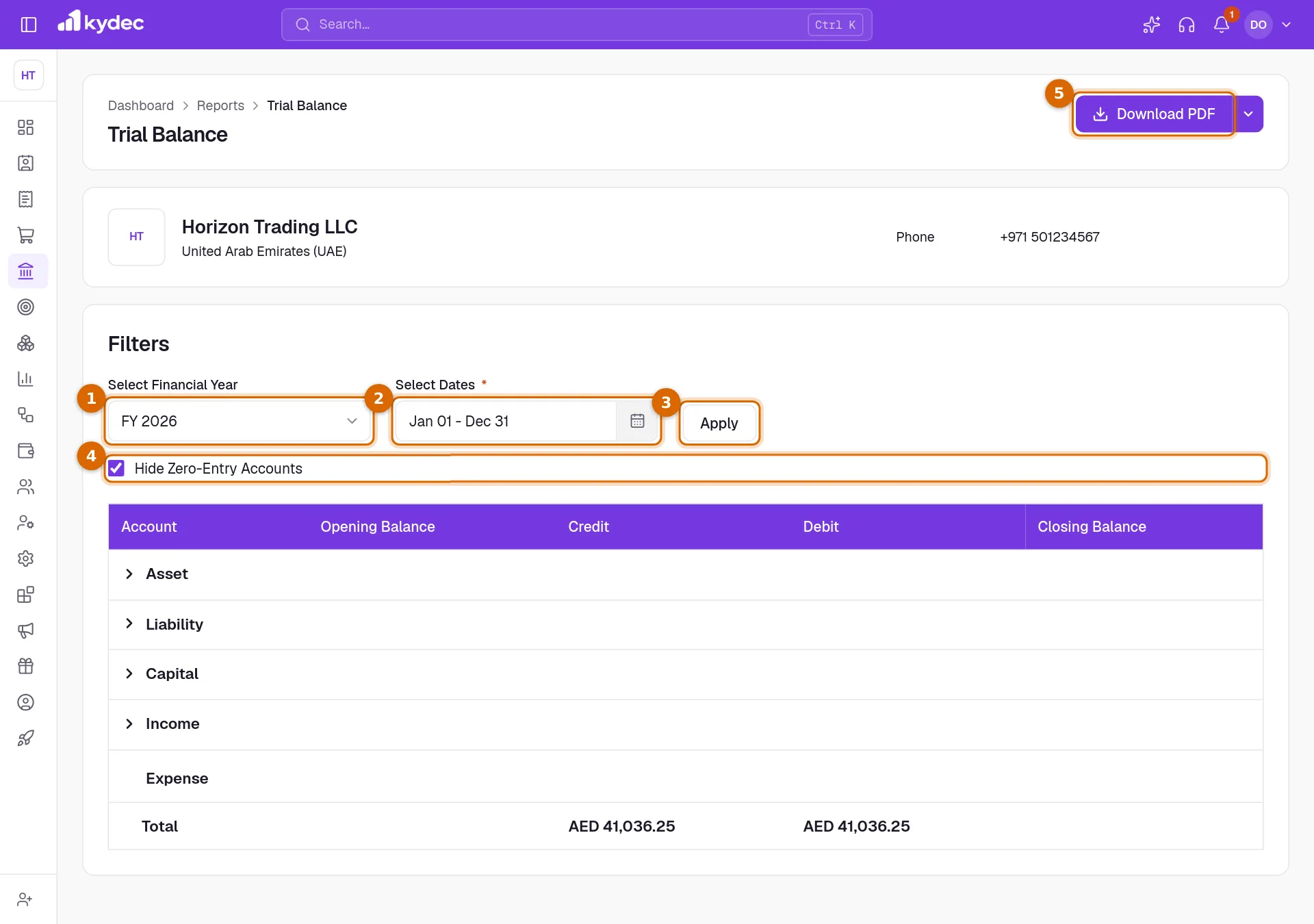
- The accounts sit under five headings: Asset, Liability, Capital, Income and Expense. Click the arrow beside one to open its account groups, and a group to open its accounts.
- Opening Balance is what the account held at the start of the dates, marked DR for a debit balance or CR for a credit balance.
- Credit and Debit are what was posted to the account within the dates.
- Closing Balance is the opening balance plus the debits, less the credits.
- The Total row adds up the Credit and Debit columns. In books that balance, the two totals are the same.
- Click the name of an account to open its statement.
Read the Profit & Loss
Open Accounting and choose Profit & Loss. It opens on the current month.
- 1Current Period sets the period. Choose today, a week, a month, a quarter or a financial year, the last 30, 60 or 90 days, or Custom to pick your own dates.
- 2No. of Previous Periods adds a column for each earlier period, up to 12. Leave it at 0 to see the current period alone.
- 3Click Apply. Nothing changes until you do, including the three tick boxes.
- 4The four cards give the current period at a glance: Income, Cost Of Goods Sold, Expense and Net Profit.
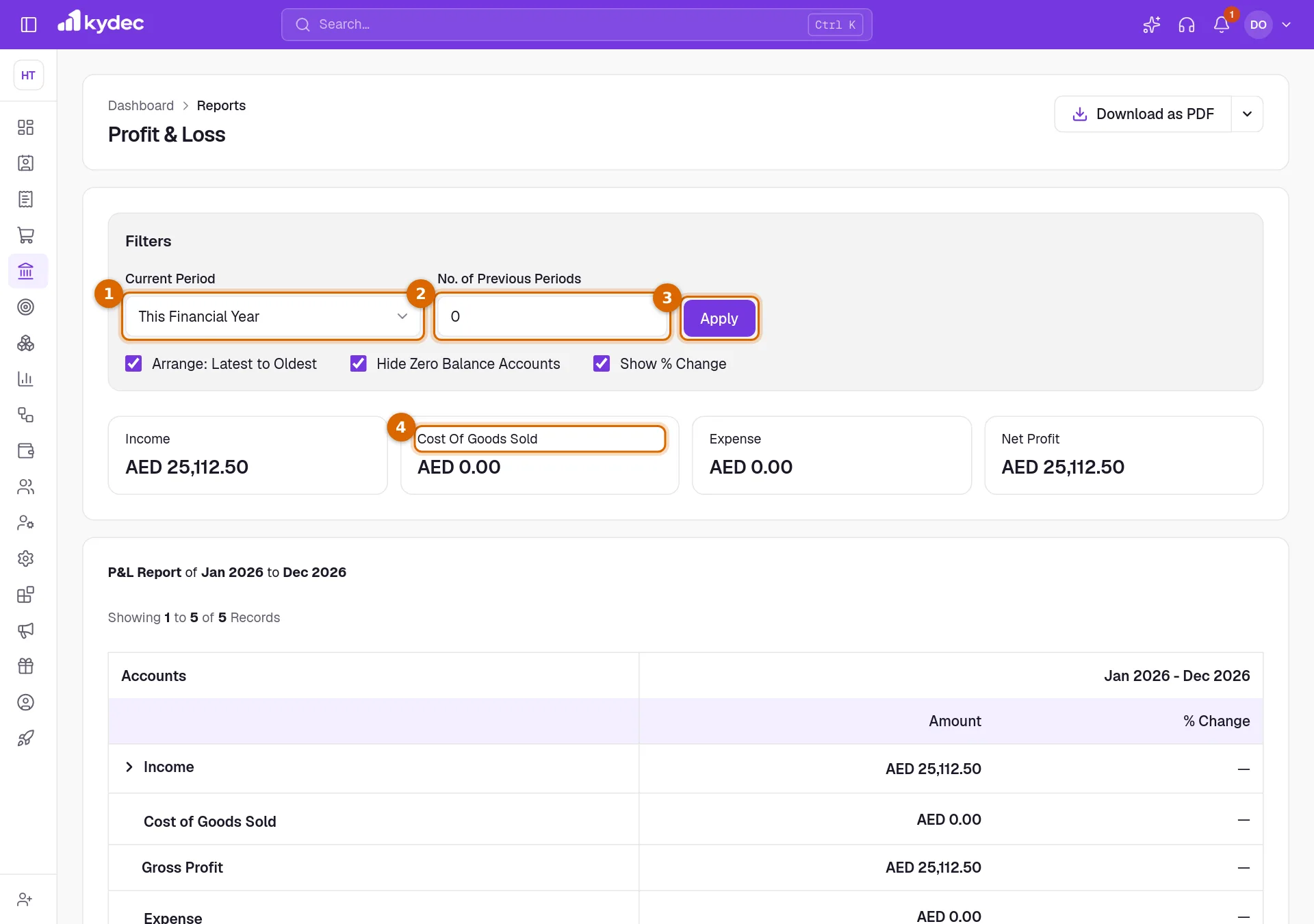
- Arrange: Latest to Oldest puts the newest period first. Hide Zero Balance Accounts leaves out accounts with nothing in any of the periods. Show % Change adds a % Change column beside each Amount: the change against the period before it, or a dash when there is nothing to compare with.
- The table has five rows. Income, Cost of Goods Sold and Expense open into categories, account groups and accounts. Gross Profit is income less cost of goods sold. Net Profit is gross profit less expense.
- Cost of Goods Sold is the expense groups filed in the Cost Of Goods Sold category. Every other expense group is under Expense.
- Quarters follow your financial year and weeks start on Monday. A "to Date" period is compared with the same number of days of the period before.
- Click the name of an account to open its statement.
- Download as PDF saves the report as it is shown. Download CSV is under the arrow beside it.
Read the Income Statement
Open Accounting and choose Income Statement. It always covers one whole financial year.
- 1Select Financial Year chooses the year.
- 2Download As saves the statement. Click it for Excel, or use the arrow beside it to choose Excel or PDF.
- 3Balance is what each account earned or cost in the year.
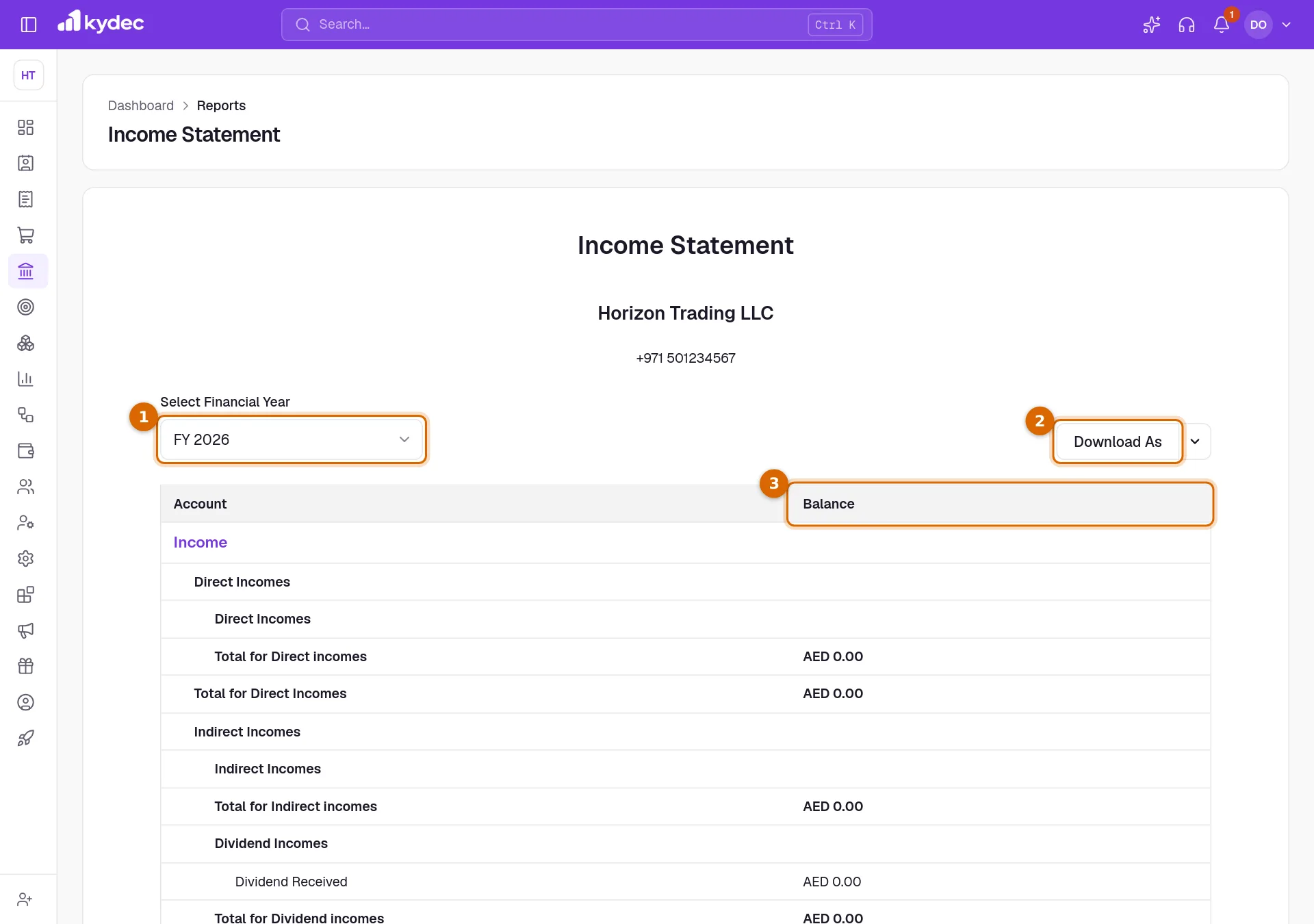
- Income comes first, then Expense. Under each you see every category, account group and account, including those at zero.
- Each group and category closes with a Total for … row. The statement ends with Total for Income, Total for Expense and Net Surplus: income less expense. A loss is shown with a minus sign.
- Click the name of an account to open its statement.
Profit & Loss or Income Statement?
- Use Profit & Loss for any period, and to compare one period with the periods before it. The Income Statement is always one financial year on its own.
- Profit & Loss separates Cost of Goods Sold and shows Gross Profit. The Income Statement lists cost of goods sold among the expenses.
- Profit & Loss can hide accounts with nothing in them and lets you open and close rows. The Income Statement prints every account in full, each group with its total.
- The result is called Net Profit on one and Net Surplus on the other. For the same financial year they are the same figure.
Rules worth knowing
- All three read the voucher entries in your books. A document counts once its type is synced under Sync Documents in Business Settings; drafts and cancelled documents are not posted.
- Figures are in your business currency.
- In the trial balance, income and expense accounts start every financial year at zero. What earlier years earned is the opening balance of Retained Earnings, listed under Capital with Current Year Earnings.
- Opening Balance Adjustments appears under Liability when the opening balances typed on your accounts do not balance. It holds the difference.
- A PDF opens your browser's print window, where you choose to save as a PDF. If nothing opens, allow pop-ups for KyDec. The Excel and CSV downloads are files that open in any spreadsheet.
- Every download holds all the rows, whether they are open on screen or not.
Common questions
- Why does Profit & Loss show zero everywhere?
- It opens on the current month. Choose a longer Current Period, such as This Financial Year, and click Apply. If it is still empty, check that your documents are synced under Sync Documents in Business Settings.
- How do I compare this month with last month?
- Set Current Period to This Month and No. of Previous Periods to 1, keep Show % Change ticked and click Apply. Each month gets a column, with the change beside it.
- Why is an account missing from the trial balance?
- Hide Zero-Entry Accounts is ticked, and the account opened at nothing and had nothing posted in the dates. Untick the box to list every account.
- What is the difference between Net Profit and Net Surplus?
- Only the name. Both are income less expenses. Profit & Loss calls it Net Profit and the Income Statement calls it Net Surplus, and for the same financial year the two agree.
Related guides
Balance Sheet
What the business owns and owes on a date, with an earlier date beside it and the entries behind every figure.
Day Book and Cash Flow
Every voucher entry day by day, the cash that came in and went out, and all your ledgers in one master report.
Accounts (Ledgers)
Create accounts, view ledger entries, and track all your financial transactions in one place.
Sync Accounting Documents & Payment Records
System will automatically create ledger accounts & vouchers, and pass journal entries for all the synced documents.