Help
Online payments with Stripe or Razorpay
Connect your own Stripe or Razorpay account so clients can pay your invoices online. The money goes to your account and on to your bank, and KyDec records each payment against its invoice.
Where to find it:Business SettingsIntegrationsPayment Gateways
What it is
Online payments let your client pay an invoice from the invoice itself, by card, UPI, netbanking or wallet, through your own Stripe or Razorpay account.
KyDec never holds the money. Your client pays on the gateway's own page, the gateway pays it out to your bank as it always does, and KyDec records the payment against the invoice.
- Connect a Stripe account, a Razorpay account, or both.
- Switch on Pay Now invoice by invoice, and choose which gateway it uses.
- Each online payment becomes a payment receipt on its invoice, with the gateway's fee recorded as transaction charges, and the invoice turns Paid.
- You are told when a client pays: a notification in KyDec and an email.
Before you start
- An account with Stripe or Razorpay, already set up and approved by them. Opening and verifying it is between you and the gateway; KyDec does not do that part.
- Its API keys: a Stripe Secret key, or a Razorpay Key ID and Key Secret. Test keys (they start sk_test_ or rzp_test_) let you try everything with test payments first.
Good to know. You need a role that includes Edit business profile and Manage accounts, upload statements and reconcile to connect or disconnect a gateway.
Find Payment Gateways
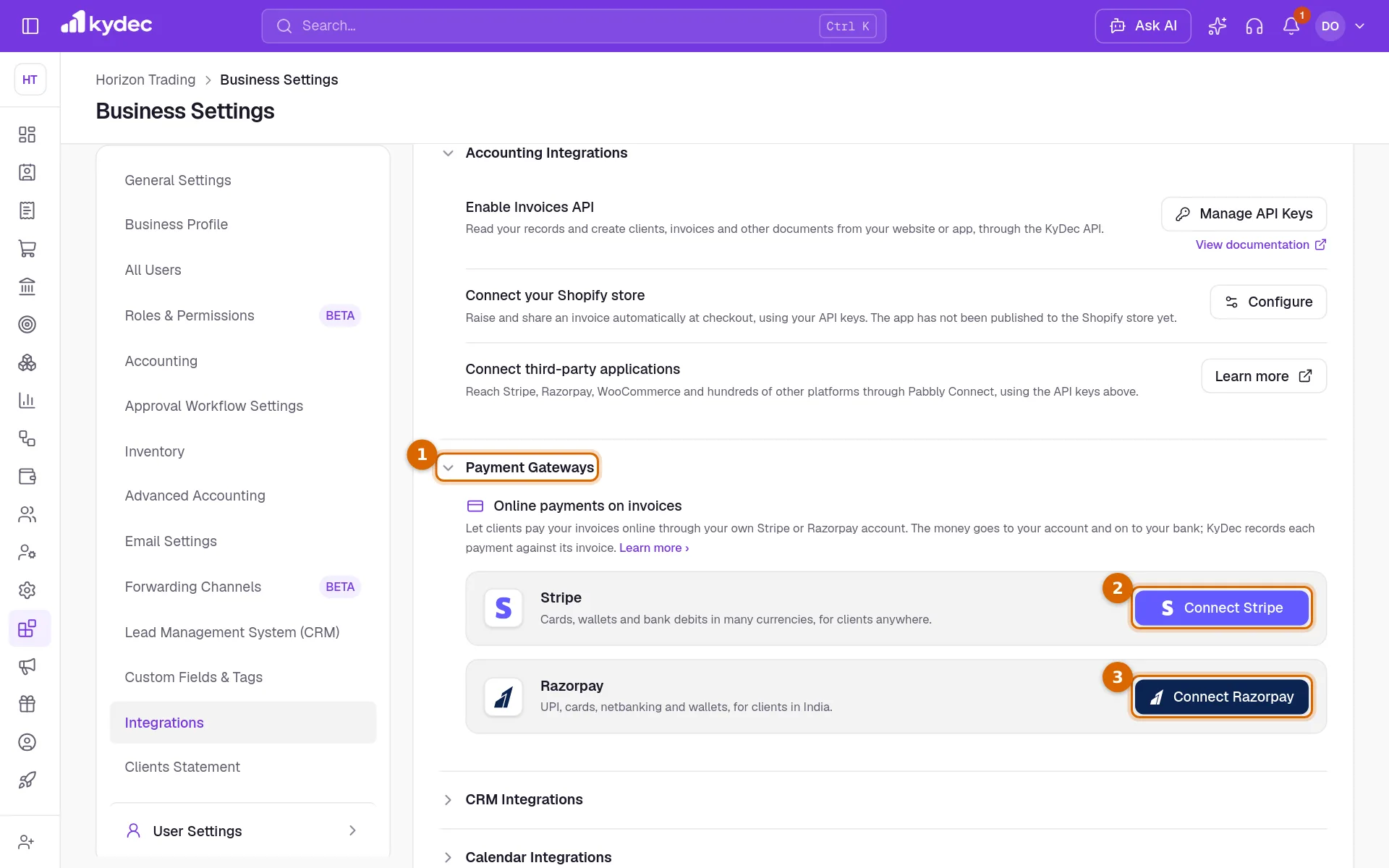
- 1Open Business Settings, choose the Integrations tab, and click Payment Gateways to open the section.
- 2Click Connect Stripe or Connect Razorpay.
- The connect dialog says where the gateway keeps its keys, with a link to its dashboard.
Enter your keys and connect
- 1For Razorpay, paste the Key ID. Stripe has no Key ID: skip this step.
- 2Paste the secret: Key Secret for Razorpay, Secret key for Stripe.
- 3Click Connect. KyDec checks the keys with the gateway and saves them only if they work.
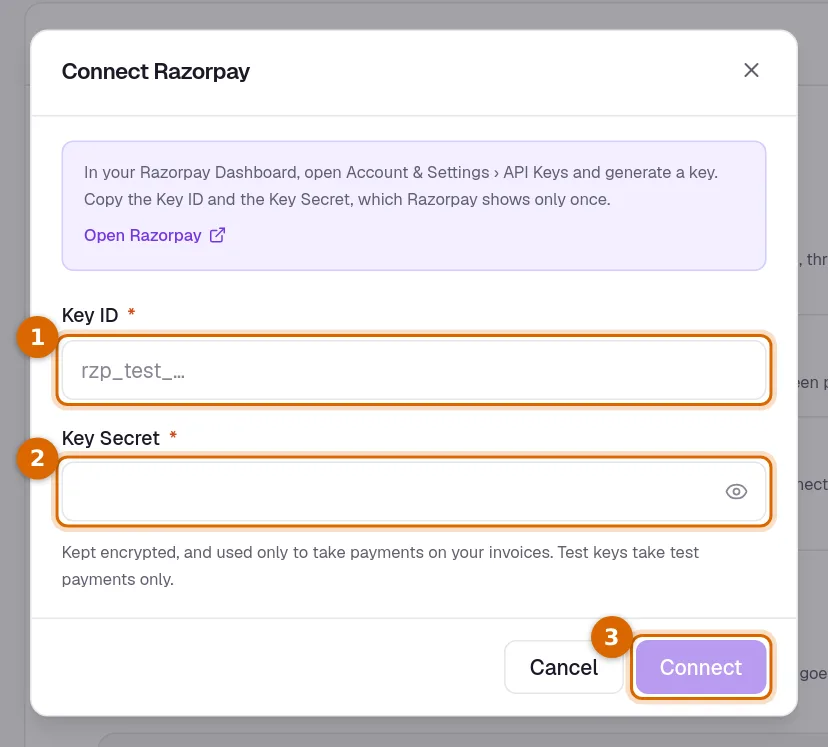
Good to know. Your keys are stored encrypted and used only to take payments on your invoices. With a wrong key nothing is connected, and you are told why.
After you are connected
- Make primary on a connected gateway makes every new invoice offer Pay Now through it by itself. Only one gateway is primary; Remove as primary goes back to switching it on invoice by invoice. Invoices already raised are not changed.
- Disconnect asks you to confirm. Payment links already sent through that gateway stop working; payments already recorded stay.
- A payment collected online cannot be edited or deleted in KyDec: its amount, charges and reference are the gateway's own record. A refund is recorded as its own entry.
- The card shows Connected, the account, and Test mode when the keys are test keys.
- A payment account named after the gateway (Stripe or Razorpay) is made under Banking, if you do not have one with that name. Online payments are recorded into it.
- Stripe: KyDec adds its webhook to your Stripe account for you, so a payment shows on the invoice the moment it is made.
- Razorpay: a box shows a Webhook URL, a Secret and three events. Add them in your Razorpay Dashboard under Account & Settings › Webhooks. Webhook details on the card shows them again whenever you need them.
- Without a webhook, payments are still recorded: KyDec checks open payments every few minutes.
Switch on Pay Now for an invoice
- 1Open the invoice and, under Invoice Settings, click Online Payment Options.
- 2Under Add Payment Link to Invoice, switch on Collect payment online, and choose the gateway if both are connected. With no gateway connected yet, the box shows Connect a payment gateway, which takes you to Integrations.
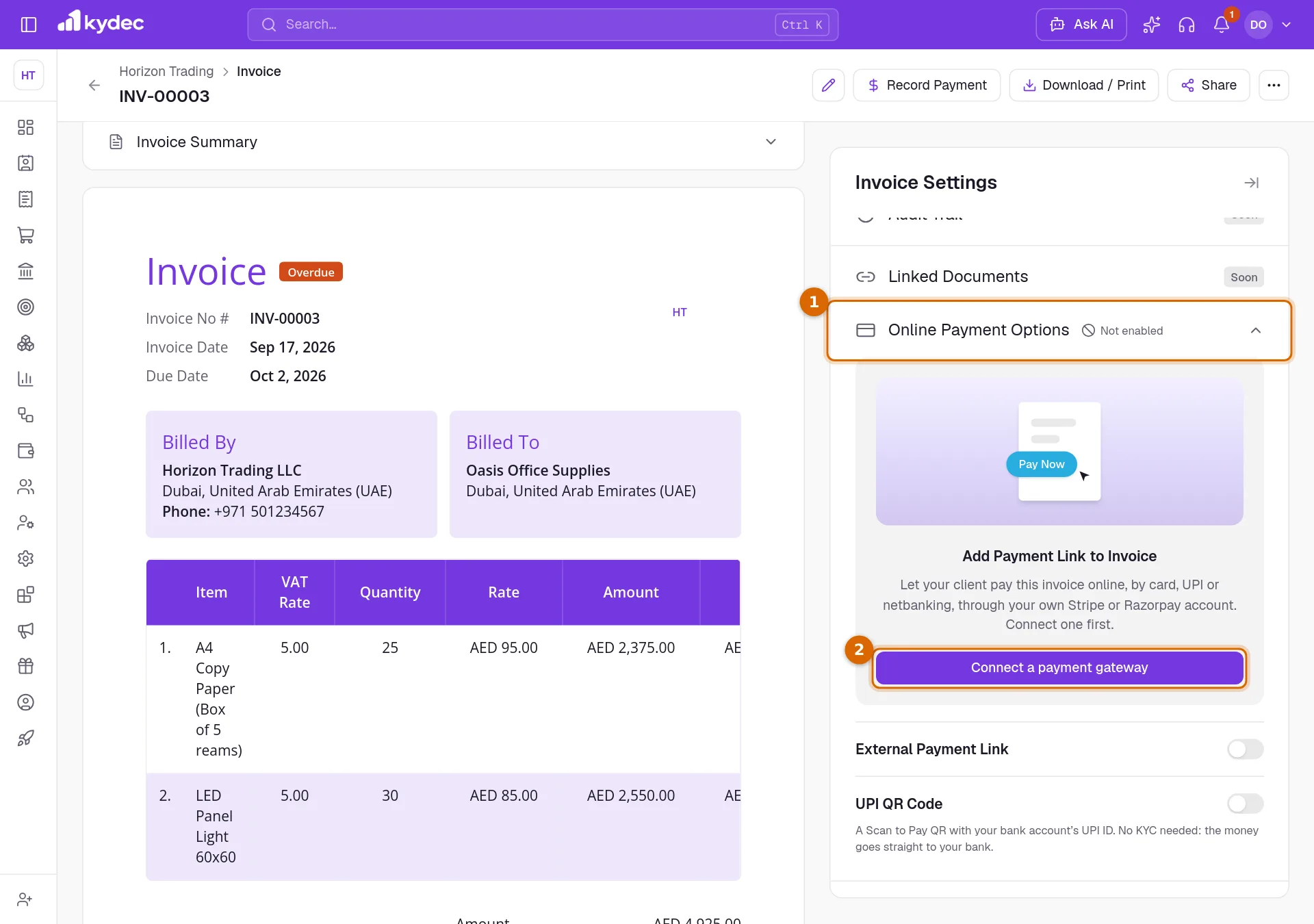
- The invoice then prints a Pay Now button, and its shared link shows Pay Online.
- Pay Now is shown only while something is left to pay on the invoice.
What your client sees
- On the shared invoice, Pay Online opens the gateway's payment page for the amount still due. Pay Now on the PDF does the same.
- They pay there, by any method your gateway account offers, and come back to the invoice, which says Payment received.
- Card and bank details are typed on the gateway's page only. They never reach KyDec.
How a payment is recorded
- A payment receipt is made against the invoice, numbered in your receipts series, and the invoice turns Paid, or Part Paid if something is still left.
- Its amount is what reaches your gateway account, and the gateway's fee is its Transaction Charges. Together they settle the invoice.
- With Advanced Accounting on, the receipt posts to your books like any other receipt.
- When the gateway pays out to your bank, match that deposit in bank reconciliation as money moved from the gateway's payment account to your bank.
- If more arrives than is due, for example because you recorded a payment by hand in the meantime, the extra stays on the receipt as an advance.
- Each payment is recorded once, however many times the gateway reports it.
Disconnect
- Disconnect on the card stops new online payments through that gateway. A payment made a moment before is recorded first, and payment pages still open are closed.
- The gateway's payment account and its receipts stay as they are.
- To use other keys, disconnect and connect again.
Common questions
- Does KyDec hold my money or take a cut?
- No. Payments go to your own Stripe or Razorpay account and on to your bank. The gateway charges its usual fees; KyDec adds none.
- Do I need to complete KYC in KyDec?
- No. KYC Details is for a KyDec payment service planned for later. Your gateway did its own checks when you opened your account with it.
- Can a client pay part of an invoice online?
- Not yet. Pay Online asks for the full amount still due. Record a part payment with Record Payment on the invoice.
- Can clients pay proforma invoices online?
- Not yet. Online payments are for invoices.
- How do I refund an online payment?
- Refund it in your Stripe or Razorpay dashboard. Then record the refund in KyDec as you do any refund: raise a credit note for the invoice and record the refund from it.
- I tried it with test keys. Is that real money?
- No. Test keys take test payments only, but KyDec still records a receipt so you can see how it works. Try it on a test invoice, and delete the receipt afterwards.
- Why does Pay Now not show on my invoice?
- It shows only while the invoice is issued (not a draft or cancelled), has something left to pay, has Collect payment online switched on, and the gateway it uses is still connected.
Related guides
Invoice
Create invoices from customisable templates, share them as a PDF, a print or a link over WhatsApp or email, and record and track what is paid against each one.
Payment Receipt
Every payment a client has made you, whether it was recorded against an invoice or matched from a bank statement. Money that settles no document yet stands here as an advance.
Bank reconciliation
Upload your account statements to check them against what this business recorded, so a payment the bank shows and your books do not is found rather than discovered at year end.
KYC details
Identity and address documents we need before settling an online payment to you. Upload one file per requirement; a reviewer checks them and the set stays editable until then.