Help
KYC details
Identity and address documents we need before settling an online payment to you. Upload one file per requirement; a reviewer checks them and the set stays editable until then.
Where to find it:Business SettingsAccountingKYC Details
What KYC is, and where it stands today
KYC, short for "know your customer", is the identity and address check that must be completed before money collected online can be paid into your bank account. In KyDec you upload the documents and send them for review from KYC Details.
KYC here is for a KyDec payment service planned for later, and a notice at the top of KYC Details says that process is on hold for new sellers. It is not needed to collect payments online today: connect your own Stripe or Razorpay account in Business Settings › Integrations › Payment Gateways, whose own checks were done when you opened that account. You can still upload and submit your documents here so they are on file.
Where to find it
- 1Open Business Settings, choose Accounting, and click KYC Details to open it.
- 2Choose KYC for individuals if you trade under your own name, or KYC for businesses for a registered company. The list of documents below changes with your choice.
- 3Click Add KYC details to upload your files.
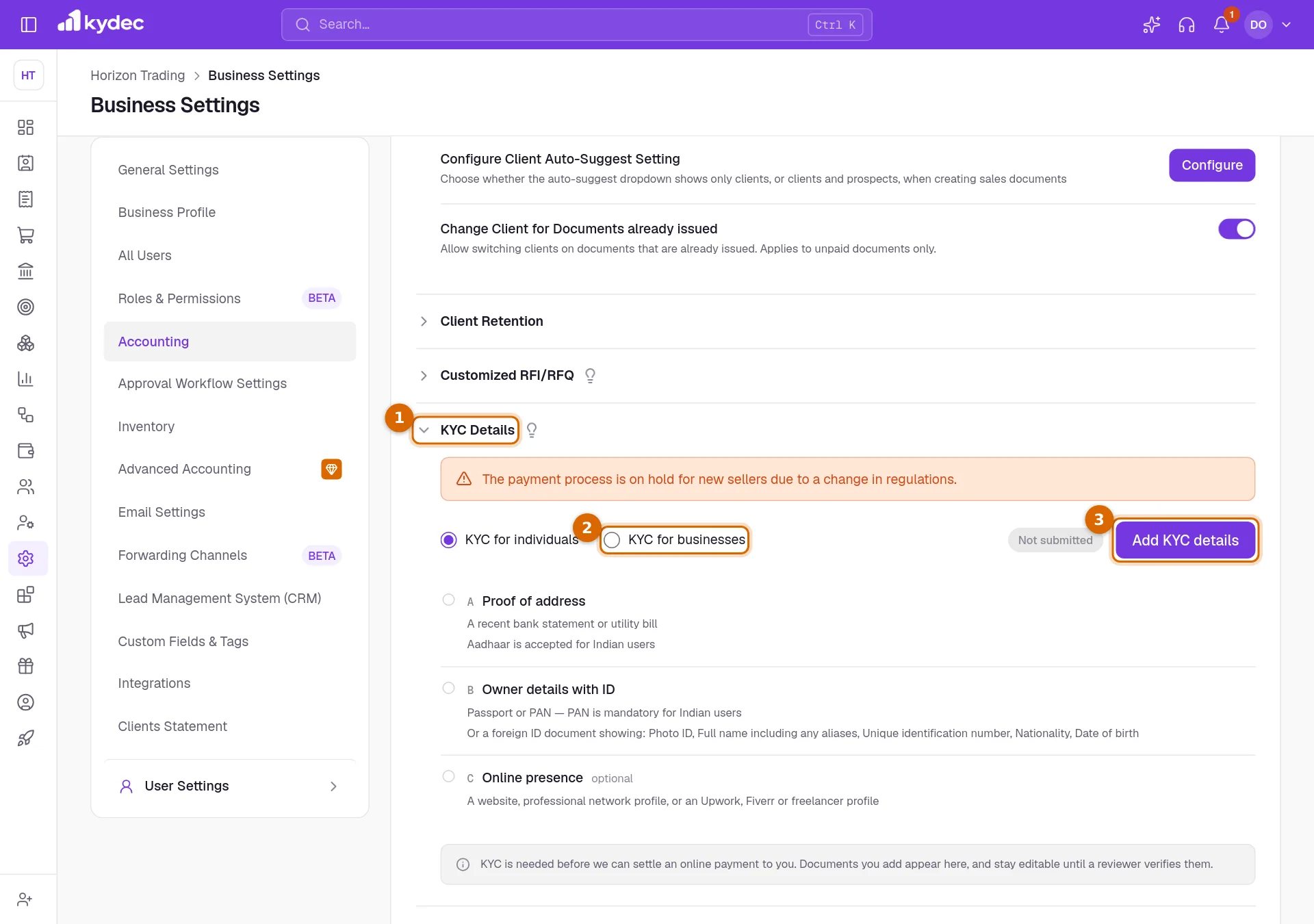
- The label beside the button is your status: Not submitted, In review, Verified or Needs attention.
- A green tick appears beside each requirement that has at least one file.
Good to know. Only people whose role has complete business permissions see KYC Details.
What you need to upload
- For individuals, Proof of address: a recent bank statement or utility bill.
- For individuals, Owner details with ID: a passport or PAN, or a foreign photo ID that shows your full name, ID number, nationality and date of birth.
- For businesses, Incorporation documents: the certificate of incorporation, the Memorandum and Articles of Association, and a Register of Shareholders and Directors endorsed by a director and dated within the last 4 months.
- For businesses, Proof of business address, dated within the last 6 months.
- For businesses, Directors and shareholders holding over 25%: ID and address proof for each of them.
- Online presence, and Business PAN for a business, are marked optional and do not hold up your submission. A PAN is mandatory for Indian users.
Upload and submit
- 1Click Upload beside a requirement and choose the file. You can add more than one file to the same requirement.
- 2When every required document has a file, click Submit for review. The button stays grey until then.
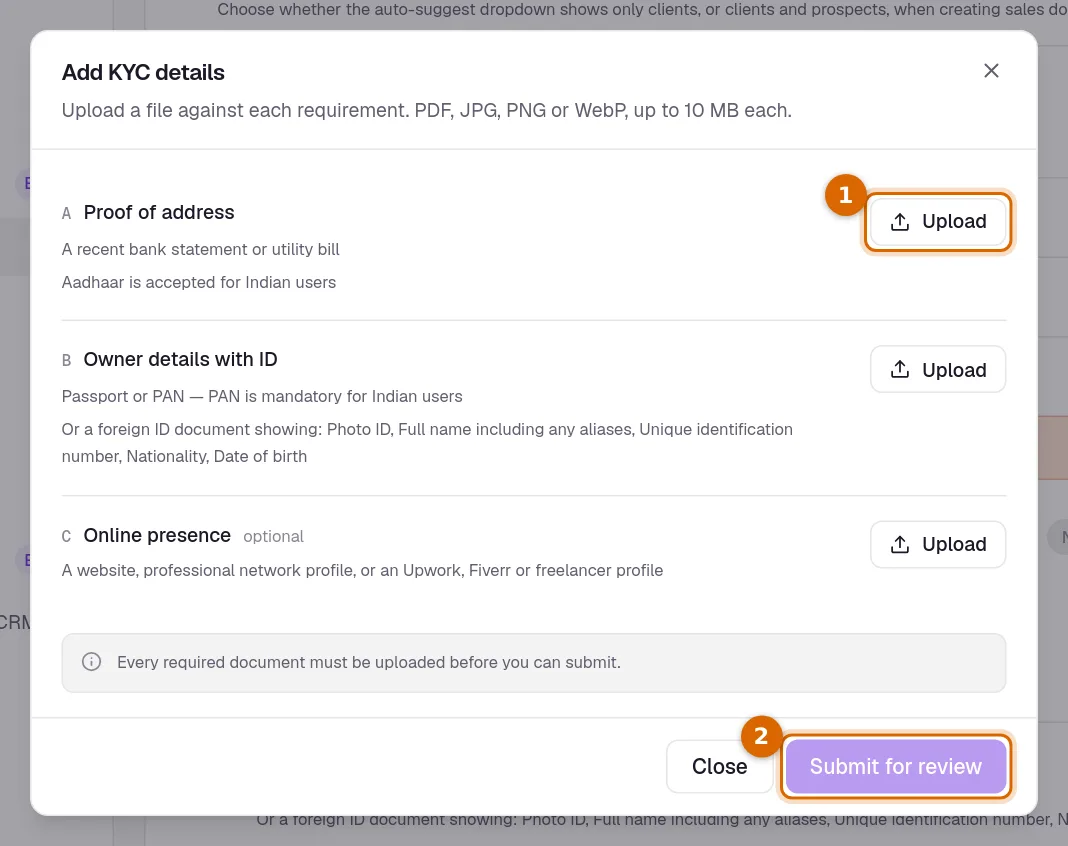
- Files can be PDF, JPG, PNG or WebP, up to 10 MB each.
- The bin beside a file removes it.
After you submit
- The status changes to In review while a reviewer checks your documents.
- If something needs fixing, the status reads Needs attention and the reviewer’s note is shown above the list.
- Adding or removing a file after you have submitted returns the status to Not submitted. Submit again when the set is complete.
- Once the status is Verified the set is locked. You cannot add or remove files or change the KYC type; contact support if something has to change.
Good to know. Switching between KYC for individuals and KYC for businesses deletes the files you have already uploaded, because the two ask for different documents.
Common questions
- Do I need KYC to send invoices or record payments?
- No. Raising documents, recording the payments you receive and collecting payments online through your own Stripe or Razorpay account all work without it.
- Can my clients pay me online today?
- Yes. Connect your own Stripe or Razorpay account in Business Settings › Integrations › Payment Gateways, then open Online Payment Options on an invoice and switch on Collect payment online. The invoice gets a Pay Now button for the amount still due; the money goes to your gateway account and on to your bank, and KyDec records the receipt against the invoice with the gateway fee. You can also print a pay link you already have with External Payment Link, or a UPI QR Code on an invoice in Indian rupees to a client in India.
- Why did my status go back to Not submitted?
- A file was added or removed after you submitted, or the KYC type was changed. The reviewer has to see the complete set, so submit it again.
Related guides
Online payments with Stripe or Razorpay
Connect your own Stripe or Razorpay account so clients can pay your invoices online. The money goes to your account and on to your bank, and KyDec records each payment against its invoice.
Business profile
The name, tax registration and address printed on everything you issue. Getting these right once keeps every document compliant.
Payment accounts
Every account money moves through — bank accounts, the cash box, cards and wallets, and employees you reimburse. What you add here is what a document can be paid into.
Invoice
Create invoices from customisable templates, share them as a PDF, a print or a link over WhatsApp or email, and record and track what is paid against each one.