
Help
AI Integrations
Connect KyDec to an AI client such as Claude or ChatGPT, so it can read your invoices, leads, inventory and expenses and answer questions about them. Coming soon.
Where to find it:Business SettingsIntegrationsAI Integrations
What AI Integrations is for
AI Integrations connects KyDec to an AI client you already use, such as Claude or ChatGPT, or to an assistant on WhatsApp. Once connected, the AI client can read your invoices, leads, inventory and expenses, so you can ask about your business in plain words instead of opening a report.
The connection uses your KyDec API keys, the same keys the KyDec API uses. You stay in control of it: the keys are yours, and you can generate new ones at any time.
Good to know. AI Integrations is coming soon. The section is already in Business Settings so you can see how it will work, but its buttons and links are switched off for now and show Soon when you point at them.
Where to find it
Open Business Settings and choose Integrations, or click Integrations in the sidebar. AI Integrations is the last section on the page, with a Coming soon label beside its name. Click the heading to open it.
- 1Get your API keys is the first step: the keys that prove a request comes from your business.
- 2Add KyDec to your AI client holds a button for each client: Connect to Claude, Connect to ChatGPT and Open on WhatsApp.
- 3Check the connection is the last step, where you confirm the AI client can reach your business.
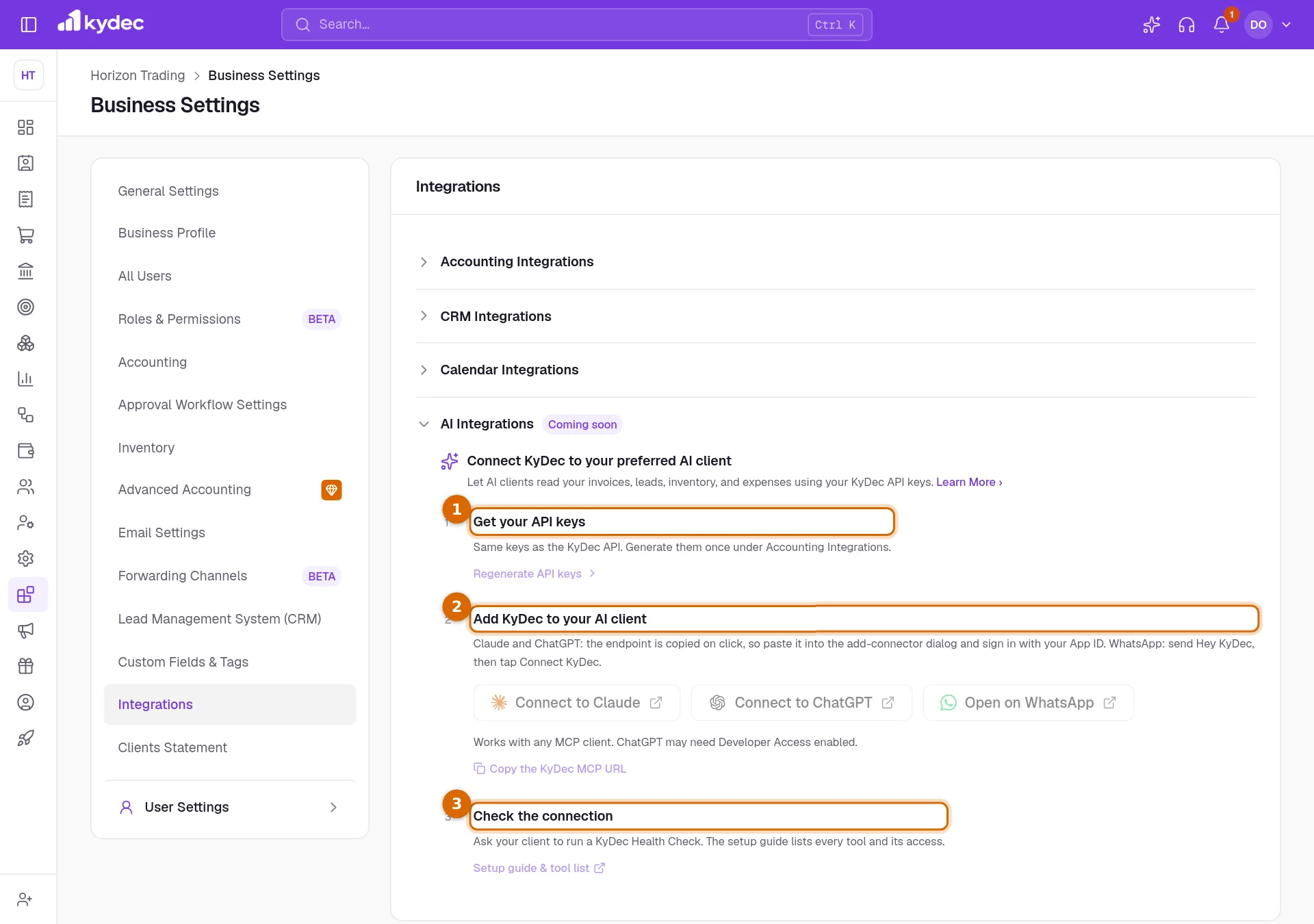
How connecting will work
When the section is switched on, connecting takes three steps.
- 1Get your API keys. They are the same keys as the KyDec API, generated once under Accounting Integrations on this page.
- 2Add KyDec to your AI client. For Claude and ChatGPT, clicking the button copies the address of the connection; you paste it into the add-connector dialog of the AI client and sign in with your App ID. On WhatsApp, you send "Hey KyDec" and then tap Connect KyDec.
- 3Check the connection. Ask your AI client to run a KyDec Health Check. The setup guide linked from this step will list every tool the AI client can use and what each one can access.
- The section says it works with any MCP client. MCP is a common standard that lets AI apps connect to other software, so clients other than Claude and ChatGPT can use the same address through Copy the KyDec MCP URL.
- ChatGPT may need Developer Access switched on in your ChatGPT account before it accepts a new connector.
What you can do today
- 1On the Integrations tab, open Accounting Integrations.
- 2On the Enable Invoices API row, click Generate API Keys. If keys already exist the button reads Manage API Keys.
- 3Store the app secret somewhere safe. It is what proves a request came from you.
- Having your keys ready means there is nothing left to prepare on the day AI Integrations opens.
- Only someone with complete business permissions sees the Enable Invoices API row.
Good to know. Treat your API keys like a password. Anyone who holds them can reach your business data through the KyDec API, so never paste them into a chat, an email or a website you do not trust.
Common questions
- Can I connect Claude or ChatGPT to KyDec now?
- Not yet. The AI Integrations section is marked Coming soon and its buttons are switched off. This guide will be updated when it opens.
- Do I need separate keys for AI Integrations?
- No. It uses the same keys as the KyDec API, which you generate under Accounting Integrations.
- What will the AI client be able to see?
- The section describes reading your invoices, leads, inventory and expenses. The setup guide in its last step will list every tool and what it can access once the feature opens.
Related guides
Invoices API
Create, edit and share invoices and other documents from your own website or app. Your app id identifies the business; the secret proves the request came from you.
WhatsApp Business
Send quotations, invoices and campaigns from your own WhatsApp Business number, so clients see your business rather than an unknown sender.
Google Calendar
Link your calendar so a meeting booked against a lead appears there, and a clash is visible before you promise a time.