
Help
Duplicate leads
We check a new lead against the ones you already have and flag a likely match, so two people do not end up working the same enquiry.
Where to find it:Business SettingsLead Management System (CRM)
What it does
The same enquiry often arrives twice: a form filled in two times, or two salespeople adding the same caller. Lead Duplication compares a lead with the others you hold and lists the ones that look the same, so that two people do not chase one customer.
You decide what "the same" means by choosing which details are compared. Nothing is compared until you switch the check on.
Good to know. Lead Duplication is marked BETA. Duplicates are looked for when you ask for them on a lead. KyDec does not merge or remove leads for you.
When a new lead looks like one you have
- When you add a lead that matches one already there, the message after saving says so and points you to Duplicate Leads on its page.
- A lead that arrives by itself, from a form or from IndiaMART, has the same thing written into its Activity History.
- Nothing is merged or removed for you: you decide what to do with the two.
Turn it on
Open Business Settings › Lead Management System (CRM) and click Lead Duplication to open the section.
- 1Switch on Enable Lead Duplicate.
- 2Under Duplication Fields, tick each detail that two leads must share to count as a match.
- 3Switch on Enable searching for duplicates across multiple pipelines if a lead should be compared with the leads in every pipeline. Left off, a lead is compared only with the leads in its own pipeline.
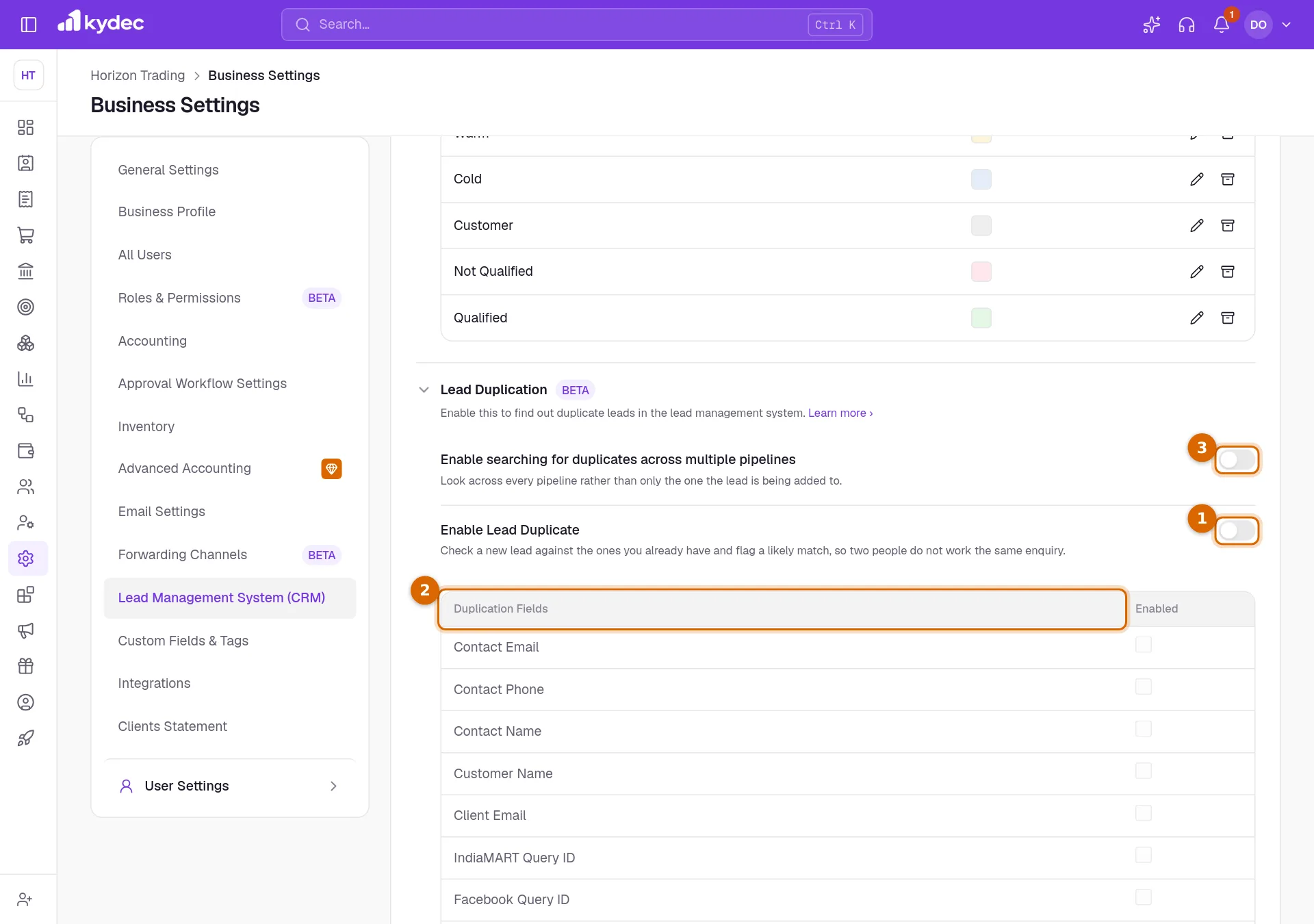
- Each switch and tick is saved as soon as you change it. There is no Save button.
Good to know. No field is ticked to begin with, so no duplicates are suggested until you tick at least one.
Which details are compared
- Contact Email, Contact Phone and Contact Name compare the person on the lead.
- Customer Name compares the prospect organisation, and Client Email compares the email address of that organisation.
- Two leads match when any one ticked detail is the same. Names and email addresses are compared without regard to capital letters. Phone numbers must be written identically.
- A detail that is empty on the lead you are checking is not compared.
- IndiaMART Query ID, Facebook Query ID and TradeIndia Query ID are for leads imported from those sources. Importing is not available yet, so ticking them has no effect today.
Find the duplicates of a lead
Open a lead and go to Duplicate Leads at the foot of its page. The same panel is at the foot of its Quick View.
- 1Click Get Duplicates. KyDec lists the leads that match on the details you ticked.
- 2Each match reads Suggested in the Is Duplicate column. Click View Lead to open it in a new tab and compare the two.
- 3If it really is the same enquiry, open More on its row and choose Mark Duplicate. The column changes to Yes, and the change is written into the Activity History of the lead.
- 4If you marked one by mistake, choose Remove Duplicate from the same menu.
- 5Refresh Duplicates runs the search again.
- A lead that is already marked as a duplicate opens with its table showing, so you see its pairs at once.
- While the check is off, the panel shows Enable Now, which brings you to this settings page.
See marked duplicates in All Leads
- 1In Sales CRM & Leads › All Leads, scroll the table sideways to the Duplicate column. It shows which leads have been marked as a duplicate of another.
- 2Use the filter under that heading to list only the marked leads, or only the rest.
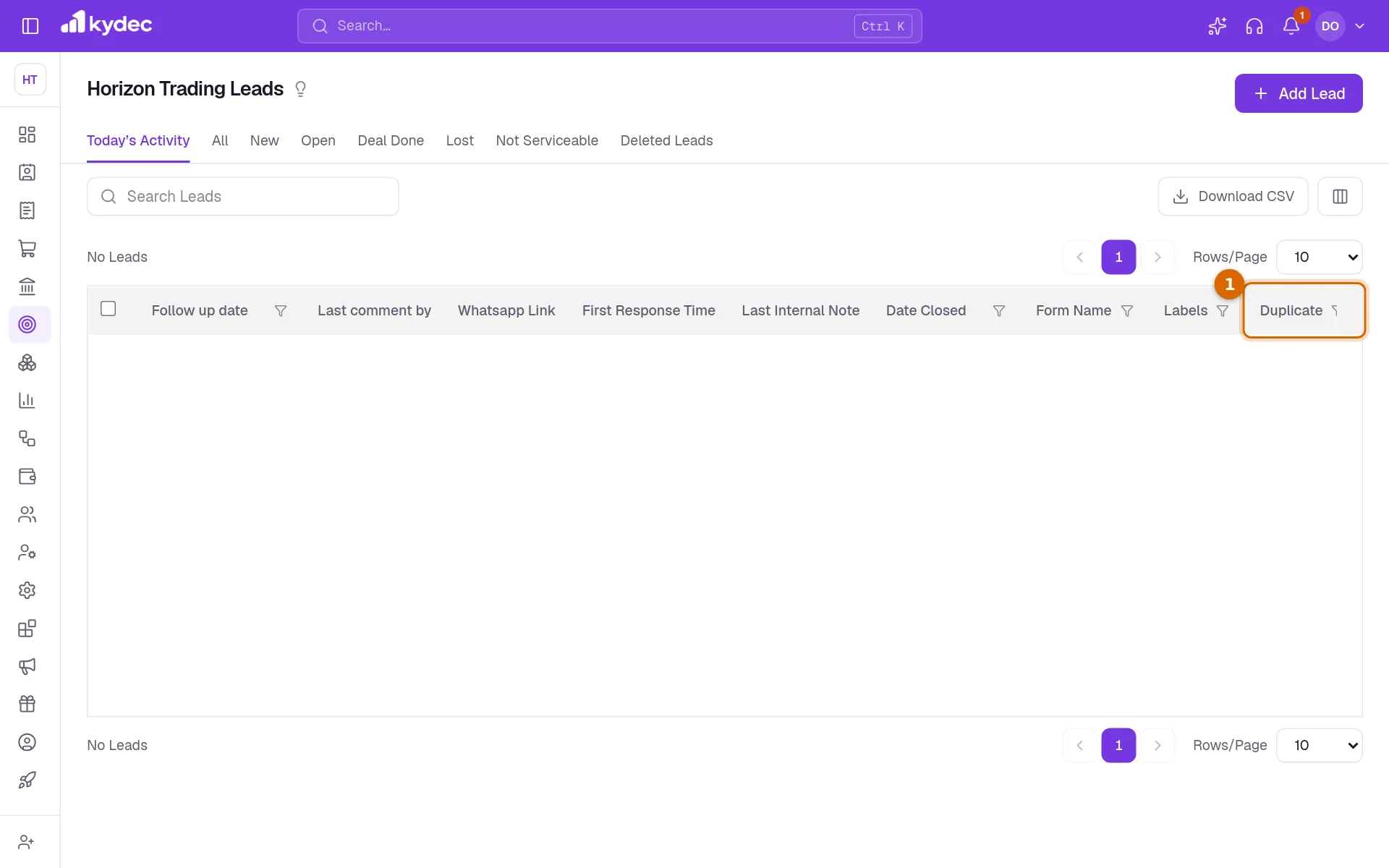
- A lead that is only suggested as a match does not count here. The column changes once someone chooses Mark Duplicate.
- Duplicate Lead in the row menu is something else: it makes a copy of a lead on purpose.
- A Sales CRM form can use the same rules. With Automatically assign leads based on duplicates on in its Configure Form part, a response that matches an existing lead is given to the teammate who already holds that lead.
Common questions
- Does KyDec warn me while I am adding a lead?
- No. A new lead is saved as usual. Duplicates are looked for when you click Get Duplicates on a lead.
- Does marking a duplicate delete or merge anything?
- No. Both leads stay exactly as they are. Marking records that they are the same enquiry, shows it in the Duplicate column of All Leads and notes it in the history of the lead.
- Why does Get Duplicates find nothing?
- Check that at least one detail is ticked under Duplication Fields and that the lead has that detail filled in. If the other lead is in a different pipeline, switch on Enable searching for duplicates across multiple pipelines.
Related guides
Streamline Lead Management
Automate lead capture with Forms & third-party integrations, manage leads across multiple pipelines, communicate over email/WhatsApp, track deal progress, track team performance, and more.
Forms
Lead capture, contact us, survey and all types of forms. Add them to your website, ads, or social media profile. Automatically capture all the data directly on KyDec.
Sales Pipelines
Create different sales pipelines for different products/services.