Help
Plans and billing
Each business has its own plan. See yours, start the free trial, upgrade, and find out what is premium.
Where to find it:Business SettingsGeneral Settings
One plan per business
A plan belongs to a business, not to your account. If you run two businesses in KyDec, each has its own plan, its own free trial and its own billing history.
Every business starts on the free Basic plan and stays there until someone starts the trial or buys a plan.
- The plan is written under the business name at the top of the sidebar: Basic Plan, Premium Trial, or the name of the plan you bought.
- Only a Super Admin of the business can start its trial, buy a plan or change it. Anyone else is told to ask a Super Admin.
- Prices are not listed here: they differ by country and can change. The pricing page always shows the current ones.
See your plan
- 1Open Business Settings. General Settings opens first, with KyDec Premium Subscription at the top.
- 2Active subscription shows the Status and the Plan type. On a paid plan it adds the Billing cycle, the Last payment and the date under Renews on.
- 3Billing history lists every charge.
- 4Upgrade opens the pricing page for this business. On a paid plan the button reads Change plan.
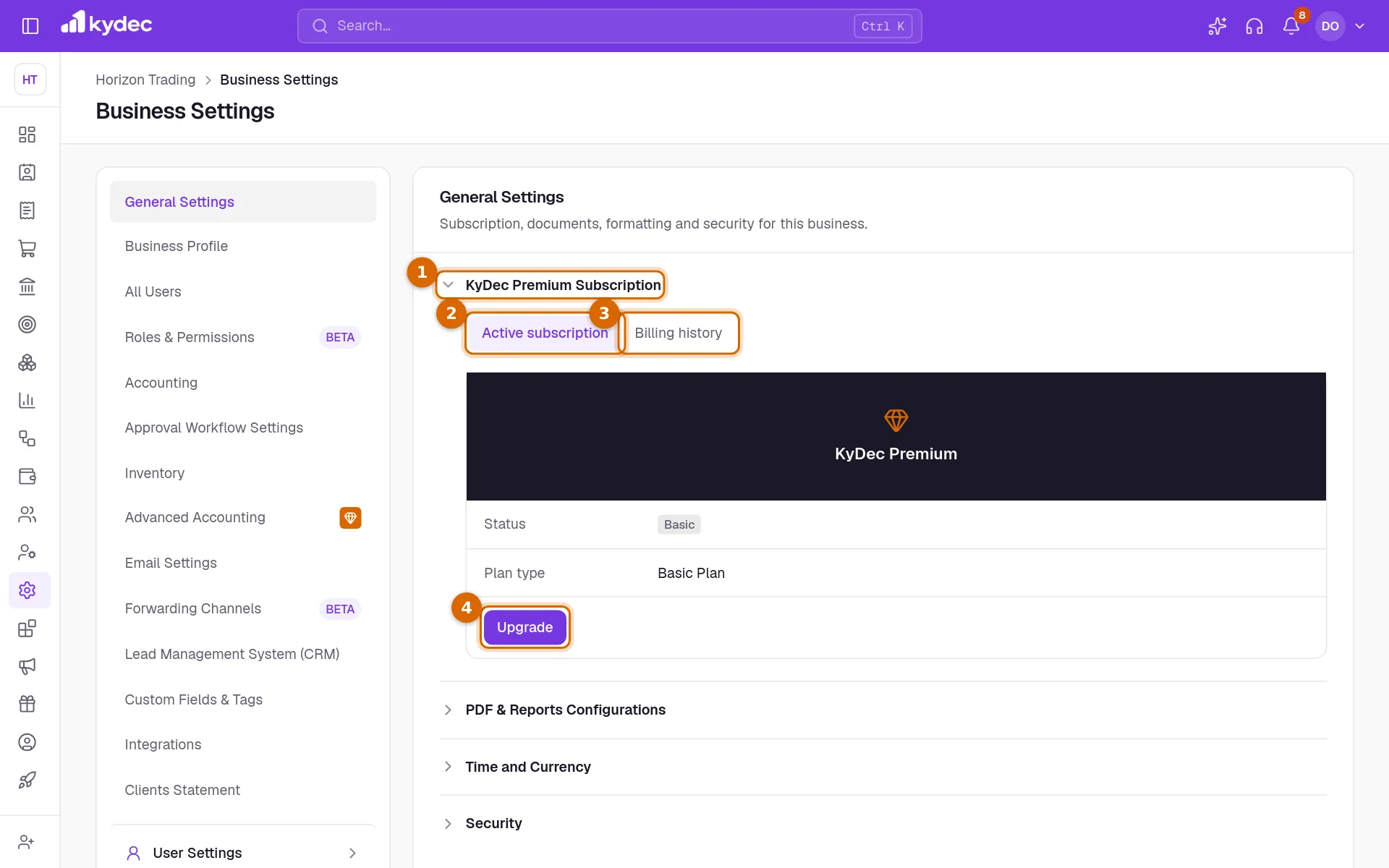
- Basic means no plan and no trial running.
- Premium trial means the free trial is running. Trial ends on shows the date and the days left.
- Active — trial means a plan was bought during the trial. First charge on shows when the first payment will be taken.
- Active means a paid plan is running.
- Payment failed means a renewal payment did not go through and is being tried again.
- Cancelling means the plan will not renew. Expiring on shows its last day.
Upgrade to a paid plan
- 1Click Upgrade. The pricing page opens for this business, in its own currency.
- 2Choose the group of plans at the top and the billing period under it.
- 3Click Upgrade now on the plan you want.
- 4Pay on the secure checkout page that opens.
- 5You are brought back to General Settings, where the plan now shows as Active.
- Your card details are entered on the checkout page of the payment provider, not in KyDec.
- If you leave the checkout without paying, you are told the checkout was cancelled and nothing is charged.
- Buy during the trial with more than two days left and the remaining days stay free: the first charge is taken when the trial would have ended.
- To move to another plan or period later, click Change plan and then Upgrade now on the new one. The difference is charged at once. If the payment needs another step, the page for finishing it opens.
- A plan with no price shows Enquire now instead and is arranged with the KyDec team.
Good to know. Prices on the pricing page do not include tax. Tax is added at checkout.
What Premium unlocks
Any paid plan, and the free trial while it runs, opens the premium features. On the Basic plan each of them shows a way to upgrade in place of its setting.
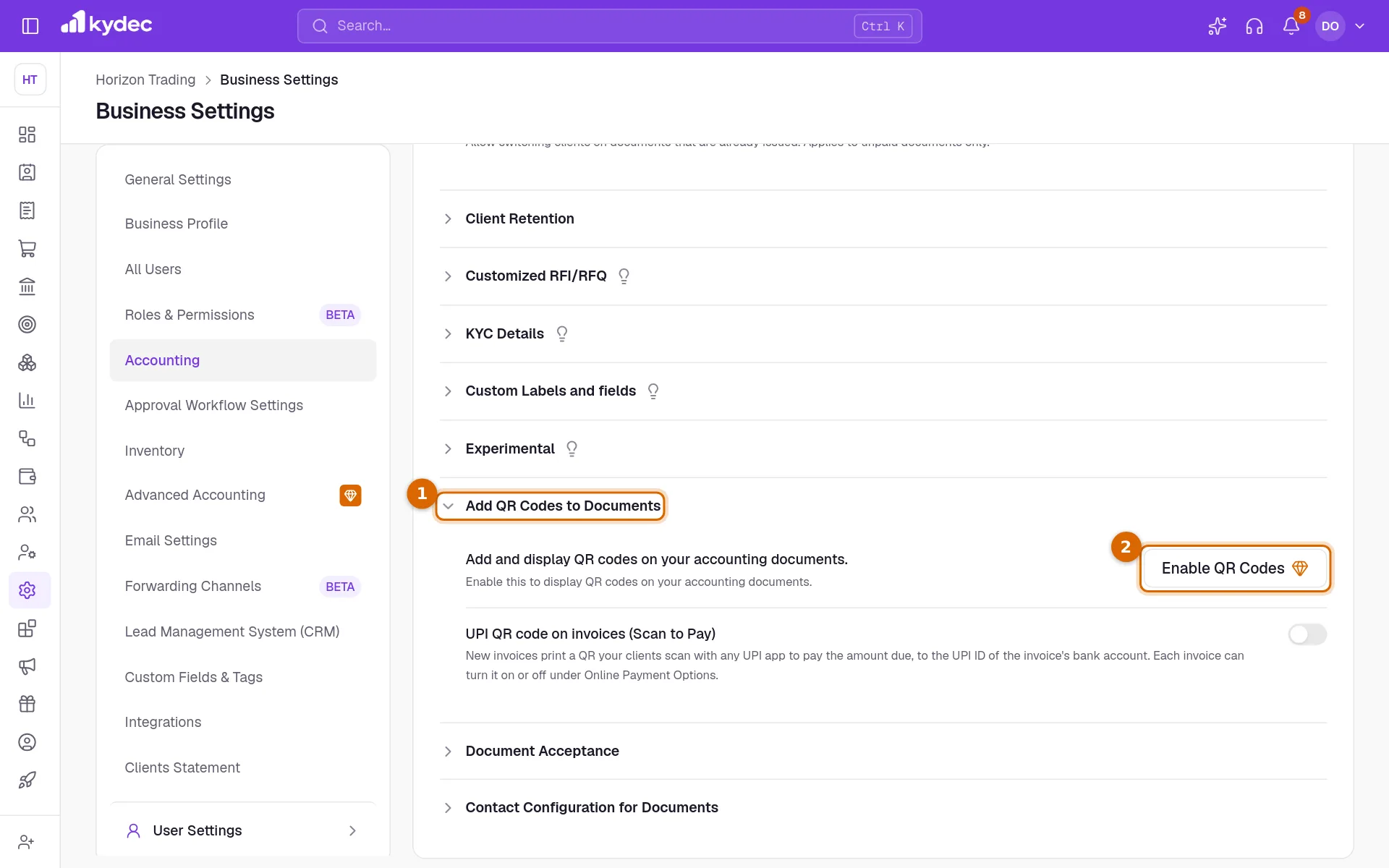
- 1Open the section that holds the setting. Here it is Add QR Codes to Documents, under the Accounting tab of Business Settings.
- 2A premium setting shows a button with a gem where its switch would be. Click it to start the free trial if it is unused, or to open the pricing page if it is not.
- Roles & Permissions: creating and changing roles. The whole tab shows the upgrade offer.
- Advanced Accounting: the whole tab, marked with a gem in the list on the left.
- Accounting tab: Add QR Codes to Documents and Document Acceptance.
- Inventory tab: Enable multi-warehouses.
- Email Settings tab, under Emails & Notifications: the notifications marked Premium, such as the lead follow-up reminders and the inventory stock alerts.
- Someone who is not a Super Admin sees these buttons greyed out, with a note to ask their Super Admin.
Good to know. The pricing page lists everything each plan includes, such as the number of users and documents. Compare all plans sets them side by side.
Billing history
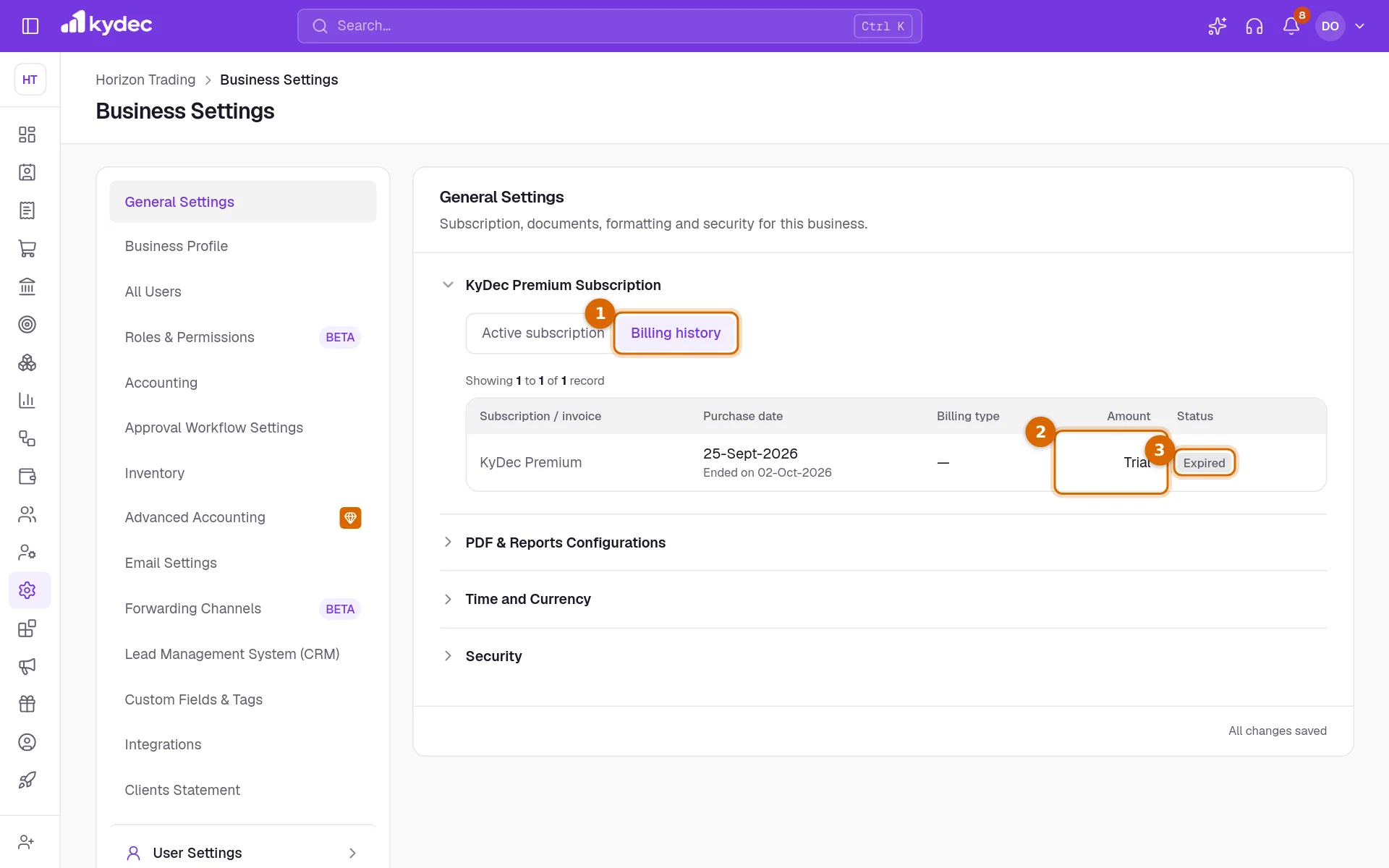
- 1Click Billing history in KyDec Premium Subscription.
- 2Each charge has a row with its invoice, purchase date, billing type and amount. The free trial has a row too, with Trial in the Amount column.
- 3Status says where each one stands: Active, Upcoming, Expired, Failed, Awaiting payment or Void.
- The invoice number opens the invoice in a new tab, and PDF downloads it.
- Pay now appears on a charge that failed or is waiting for payment.
- Before anything has been charged the tab says No payments yet.
When a trial or a plan ends
- Nothing is locked out. Everyone can still sign in, and every document, client and setting stays where it is.
- The business goes back to Basic, and the premium sections show the upgrade offer again.
- Premium settings that were switched on stop working: QR codes are no longer printed on documents, for example. Your choices are kept and come back the day the business is on a plan again.
- Roles you created keep working for the people who hold them. They cannot be changed until the business is on a plan again.
- When a renewal payment fails, the plan stays on while the payment is tried again and the status reads Payment failed. Pay the open invoice with Pay now under Billing history. If it is never paid, the plan ends and the business goes back to Basic.
Good to know. Removing a business stops its plan renewing. What was paid for runs to the end of its period, and restoring the business in that time turns renewal back on.
Common questions
- I have two businesses. Do I need two plans?
- A plan covers one business. Each business has its own plan, starts on Basic, and can use its own free trial.
- Will I lose my data if I do not upgrade after the trial?
- No. The business goes back to the Basic plan and keeps everything. Only the premium features stop, and they show the upgrade offer again.
- Can I have a second free trial?
- No. Each business gets one trial of 7 days. After that the buttons read Upgrade.
- How do I cancel a plan?
- There is no cancel button in the app today. Removing a business stops its plan renewing. For anything else, contact the KyDec team.
Related guides
Roles and permissions
Decide what each role can see and do, module by module, down to seeing only their own records.
Advanced accounting
Manual ledgers and voucher entries, plus the back-fills that populate them: carry closing balances into a new financial year, and generate vouchers for documents you have already raised.
Inventory and units
Track stock from the documents that move it, choose the units you buy and sell in, and set the levels that raise a re-order or over-stock alert.
Sign up and set up your business
Create your account, set up your first business, and add or switch between businesses.