
Help
Prepare Your VAT Return
See your sales and supplies, purchases and other inputs, and the net VAT due for a reporting period, ready to file your VAT return.
Where to find it:ReportsReportsVat Returns
What the report answers
How much VAT do you owe for the period, or can you reclaim? The report adds up the VAT on your sales and the VAT on your purchases for the dates you choose, and sets one against the other.
It gives you the figures to enter in your VAT return. Filing the return is still done on the portal of your tax authority.
- Sales come from your invoices. Purchases come from your purchases and expenses.
- A document counts in the period its date falls in. Drafts and cancelled documents are left out.
- Every figure is in your business currency. A document in another currency is converted at the exchange rate saved on it.
Good to know. Credit notes and debit notes are not read by this report, and corrections or credit carried forward from an earlier period are not kept. Allow for them yourself before you file.
Open the report
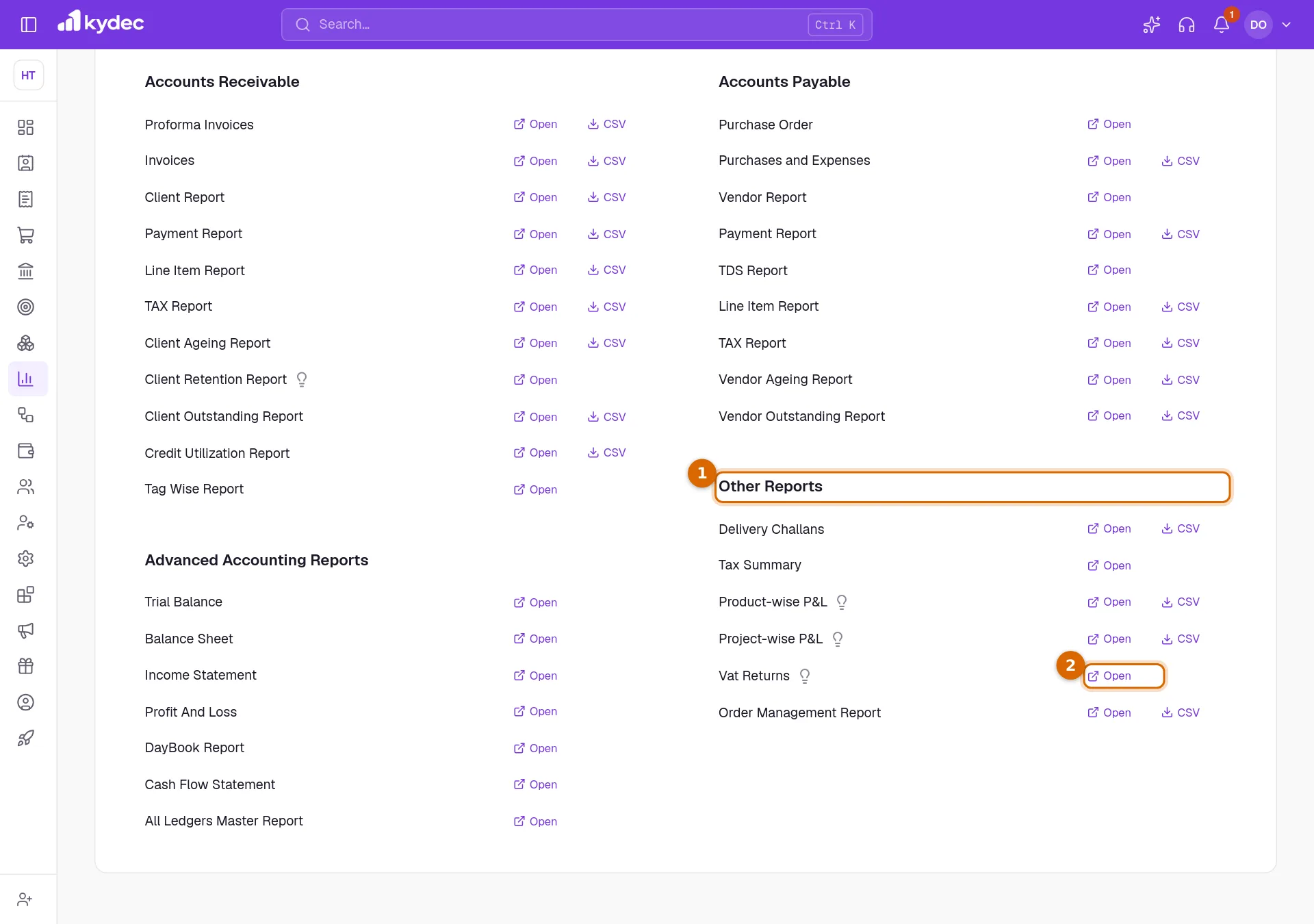
- 1Open Reports in the sidebar, choose Reports, and scroll to Other Reports.
- 2On the Vat Returns row, click Open.
Good to know. You need a role that can view invoices and includes Tax & compliance reports.
Choose the period and read the summary
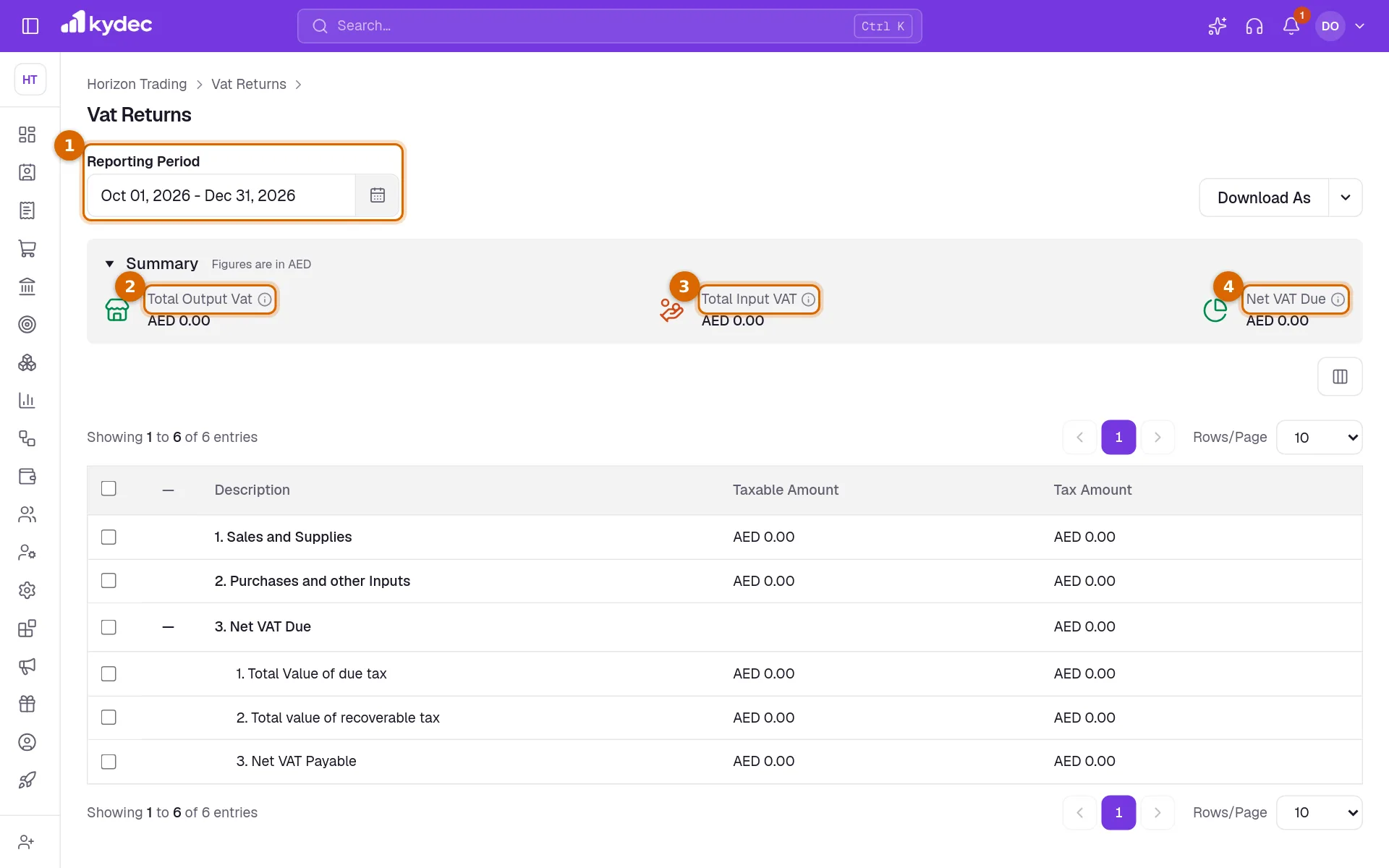
Click Summary to open the three totals. They change with the period.
- 1Reporting Period sets the dates. The report opens on the current quarter. Click it to pick two dates on the calendar, or one of Current Quarter, Previous Quarter, This month and Previous month. All Dates removes the limit.
- 2Total Output Vat is the VAT due on your sales for the period, together with the reverse charge you account for on purchases.
- 3Total Input VAT is the VAT on your purchases and expenses that you can recover.
- 4Net VAT Due is output VAT less input VAT: what you pay for the period. Below zero, it is what you reclaim.
Good to know. The quarters offered are calendar quarters: January to March, April to June, and so on. If your VAT period is different, pick its first and last day on the calendar.
Read the lines of the return
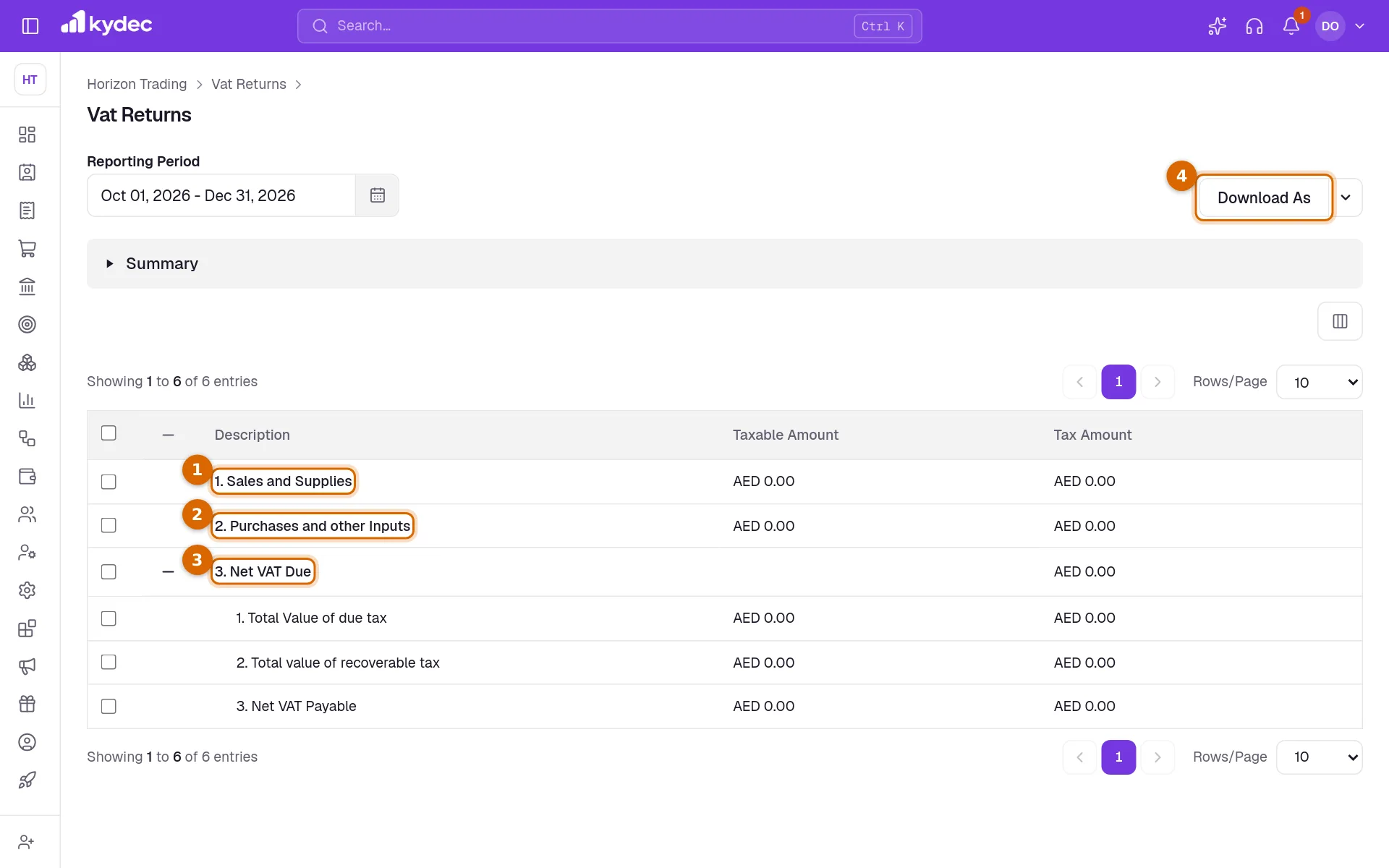
- 11. Sales and Supplies is the value of your sales before tax under Taxable Amount, and the VAT charged on them under Tax Amount.
- 22. Purchases and other Inputs is the same for your purchases and expenses.
- 33. Net VAT Due opens into three lines. 1. Total Value of due tax is your sales plus any purchases under reverse charge. 2. Total value of recoverable tax is your purchases. 3. Net VAT Payable is the first less the second.
- 4Download As saves the return, as described in the next section.
- A purchase under reverse charge carries its VAT on both sides, as tax due and as tax recoverable, so it does not change what you pay.
Download the return
- Click the arrow on Download As and choose Excel or PDF. Clicking Download As itself gives the Excel file.
- Excel saves the lines as a file you can open in Excel or any spreadsheet.
- PDF opens the return, with its summary, in a new tab together with your browser's print window. Choose to save as PDF there.
Good to know. If nothing opens when you choose PDF, your browser is blocking pop-ups. Allow them for KyDec and try again.
Common questions
- Does KyDec file the VAT return for me?
- No. The report prepares the figures. You enter them and file on the portal of your tax authority.
- An invoice is missing from the figures. Why?
- It is a draft, it is cancelled, or its date is outside the Reporting Period. Check the invoice, then the dates.
- I issued a credit note. Why has my VAT not gone down?
- The report reads invoices, and purchases and expenses. Credit notes and debit notes are not included, so adjust the figures for them before you file.
- Which exchange rate is used for an invoice in another currency?
- The rate saved on that invoice.
Related guides
Taxation and billing
Set your tax system, default rate, due dates and financial year once. Every document you raise afterwards inherits them.
Invoice
Create invoices from customisable templates, share them as a PDF, a print or a link over WhatsApp or email, and record and track what is paid against each one.
Purchases and Expenses
Record, track, manage, and analyze all your purchases and expenses in one place.
Credit Note
Give a client credit back — for returned goods or an overcharge — against an invoice, and track how much of it they have used.