
Help
Track Product Profitability
Track the average purchase price, average selling price, and gross profit margin for each of your products.
Where to find it:ReportsReportsProduct-wise P&L
What the report answers
Which of your products make money, and which only look busy? For each item the report sets what you sold it for against what it cost you, over the period you choose, and works out the gross profit margin.
It reads invoices for the sales side, and purchases and expenses for the cost side. Drafts and cancelled documents are left out.
Good to know. An item appears only where it was picked from your item list on the document. A line typed in by hand is not counted.
Open the report
- 1Open Reports in the sidebar, choose Reports, and scroll to Other Reports.
- 2On the Product-wise P&L row, click Open.
- 3CSV on the same row downloads the report without opening it, for the dates chosen at the top of the Reports page.
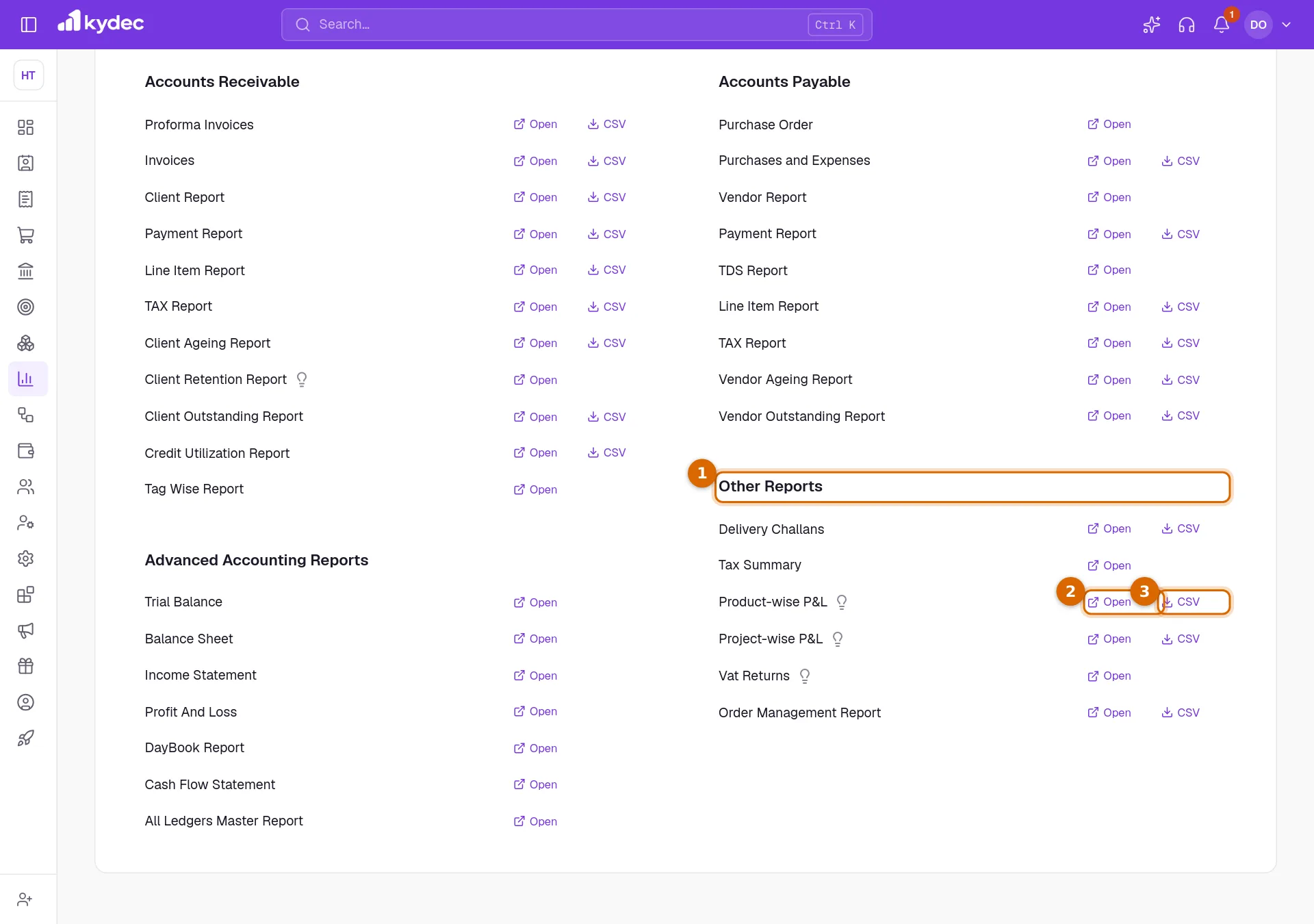
- The report is also the Product-wise P&L tab on every Products & Inventory page, such as All Items.
Choose the period and find an item
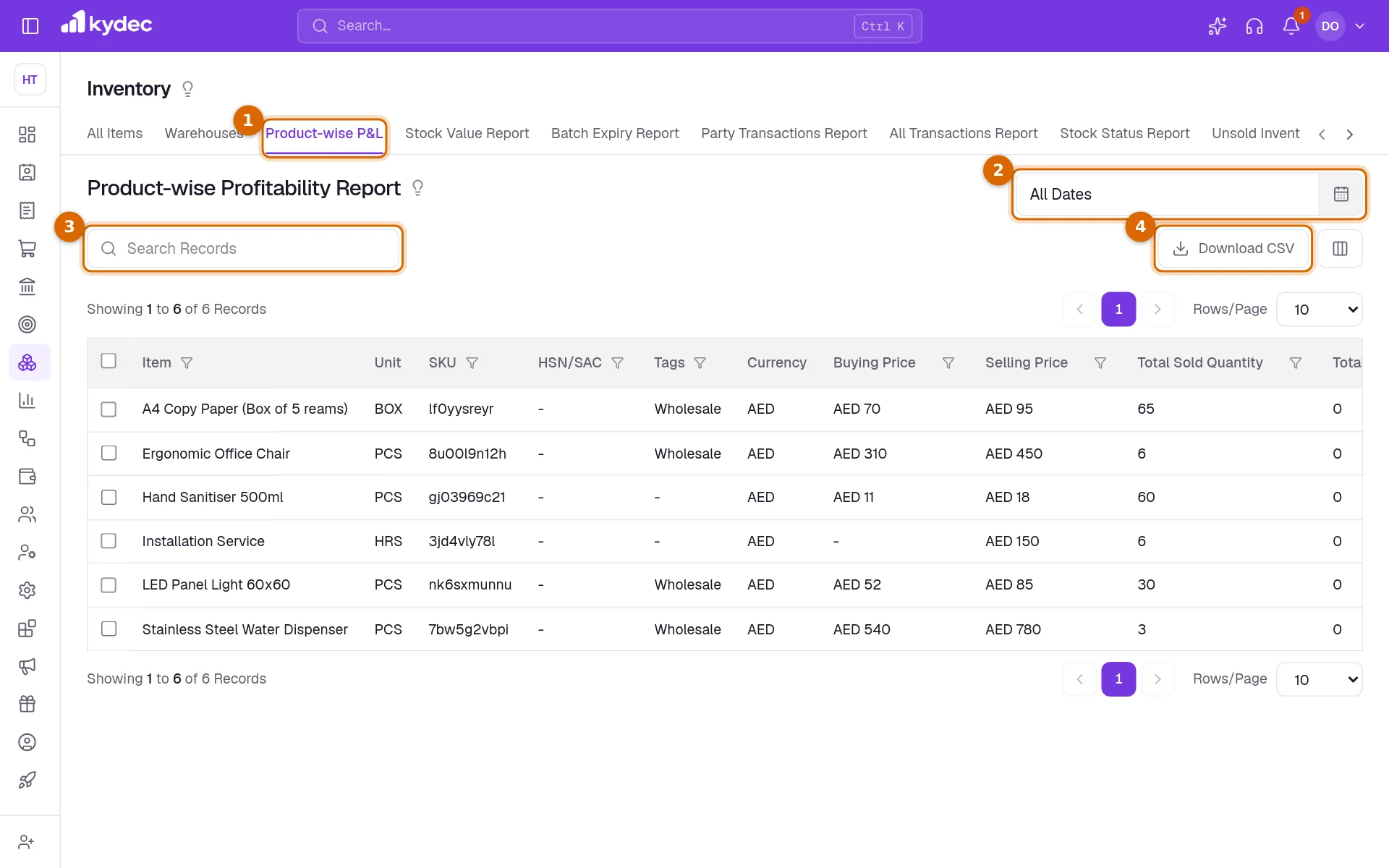
- 1The Product-wise P&L tab is selected. The other tabs are the rest of Products & Inventory.
- 2The date range at the top right sets the period. The report opens on the current month. Click it to pick two dates on the calendar, or one of This Financial Year, Previous Financial Year, Current Quarter, Previous Quarter, This month and Previous month. All Dates removes the limit.
- 3Search Records finds an item by its name or its SKU.
- 4Download CSV saves what the report is showing as a file for a spreadsheet.
- The sort arrows and the filter under each column heading narrow the list further, for example to the items that carry one tag.
- The columns button beside Download CSV (Show/Hide Columns) chooses which columns show in the table and in the file. Package Item is hidden until you switch it on there.
What each column means
- Item, Unit, SKU, HSN/SAC and Tags come from the item itself.
- Currency, Buying Price and Selling Price are the item's own currency and the prices saved on it, not what was charged on any document.
- Total Sold Quantity is how many were invoiced in the period. Total Purchase Quantity is how many were bought in it.
- Current Stock is the stock in hand now, whatever period you chose.
- Average Selling Price is the value sold before tax, divided by the quantity sold. Its heading carries your business currency, and amounts in other currencies are converted to it.
- Average Buying Price is the value bought before tax, divided by the quantity bought.
- Average Landed Cost is the buying price plus the item's share of the additional charges on the purchase, such as freight or duty. The charges are shared between the lines by their value.
- Gross Profit Margin(%) is the average selling price less the cost, as a percentage of the average selling price. The cost is the landed cost; if the item was not bought in the period, it is the Buying Price saved on the item.
Good to know. A dash means there was nothing to work it out from: no sales in the period for the selling price and the margin, no purchases for the buying price and the landed cost.
Download the report
- 1Set the period and any filters first: the file holds what the report is showing, on every page of it.
- 2Click Download CSV. A small window prepares the file.
- 3Click Download when it says the file is ready.
Good to know. Opening the report needs a role with Can access inventory reports. Downloading it needs Can download inventory reports.
Common questions
- Why is an item I sold missing from the report?
- Either the invoice is a draft, is cancelled or is dated outside the period, or the line was typed in by hand. Only lines picked from your item list are counted.
- Why does an item show a margin although I did not buy it this month?
- With no purchase in the period, the margin is worked out against the Buying Price saved on the item. Widen the period to include the purchase and the landed cost is used.
- I sell the same item by the box and by the piece. Are the quantities converted?
- No. Quantities are added as they are written on each line, without converting between units. Keep an item to one unit on your documents for the averages to be right.
Related guides
Inventory and units
Track stock from the documents that move it, choose the units you buy and sell in, and set the levels that raise a re-order or over-stock alert.
Invoice
Create invoices from customisable templates, share them as a PDF, a print or a link over WhatsApp or email, and record and track what is paid against each one.
Purchases and Expenses
Record, track, manage, and analyze all your purchases and expenses in one place.
Track Project Profitability
Tag your invoices and expenses with project names to track the net income of all your projects through tagged reports.