
Help
Track Project Profitability
Tag your invoices and expenses with project names to track the net income of all your projects through tagged reports.
Where to find it:ReportsReportsProject-wise P&L
What the report answers
Did each project make money? Give a project a tag, put that tag on its invoices and on the purchases and expenses made for it, and the report sets one against the other.
Every tag is treated as a project. For each one you see what was invoiced, what was spent, what is still unpaid on both sides, and the net income.
Good to know. A document with two tags is counted in full under each of them. Give a document one project tag if you want the projects to add up to your totals.
Tag your documents with the project
Tags are added from the list, not inside the document form. Do this on Invoices under Sales & Invoices, and again on Purchases & Expenses.
- 1Find the Tags column of the list. You may need to scroll the table to the right.
- 2Click Add Tags on the row of the document. Search tags narrows the list as you type; click the tag of the project to add it.
- 3Edit Tags opens your list of tags, where you add a tag for a new project.
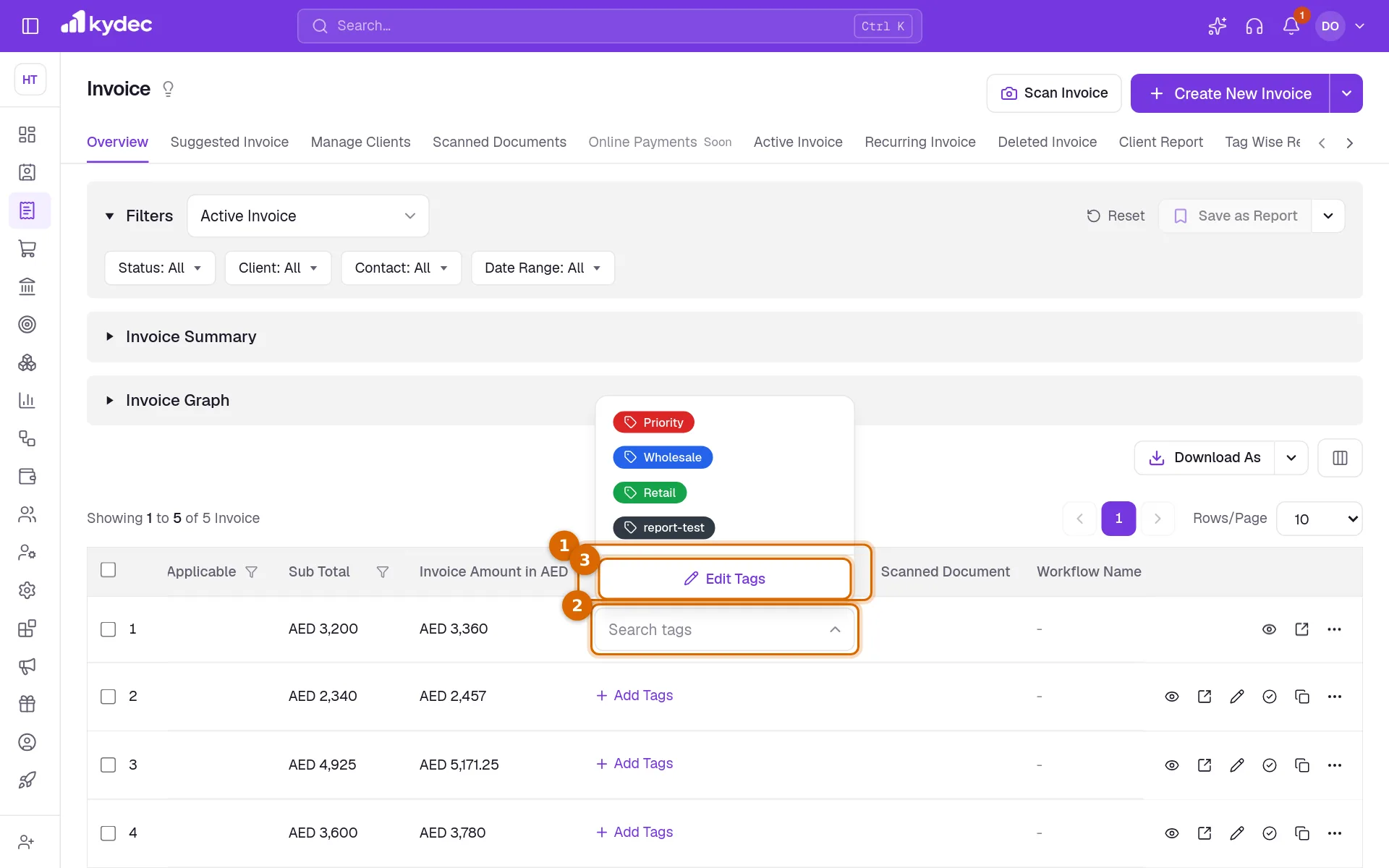
- Your tags are also kept in Business Settings, on the Custom Fields & Tags tab under Custom Tags. Add New Tags makes one there.
- Only active tags are offered. The x beside a tag on a row takes it off that document.
Open the report and set it up
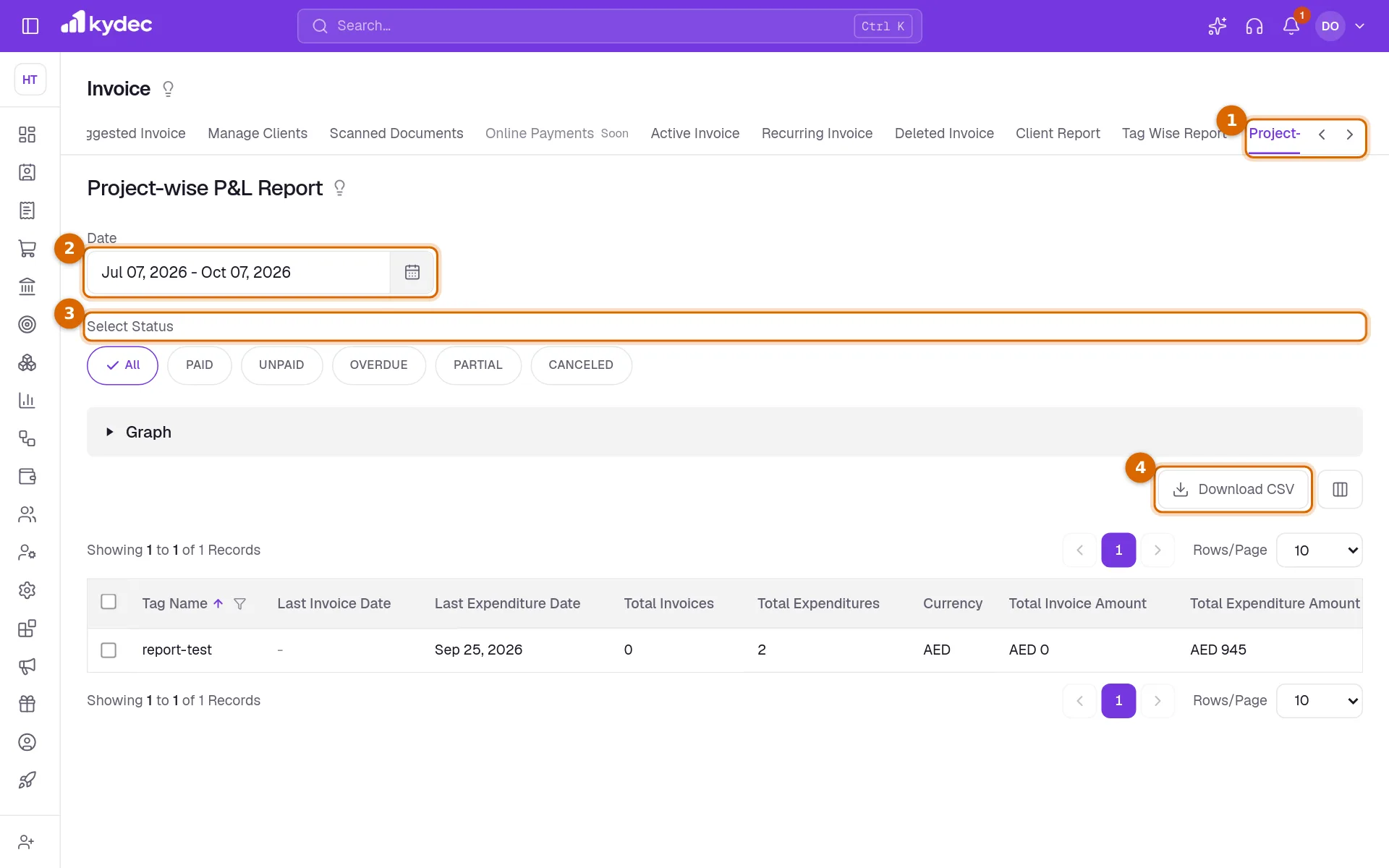
- 1Open Invoices and choose the Project-wise P&L tab. The same tab is on Proforma Invoices and on Purchases & Expenses, and Reports lists it under Other Reports.
- 2Date sets the period. The report opens on the last three months. Click it to pick two dates, or one of This Financial Year, Previous Financial Year, This month and Previous month. All Dates removes the limit.
- 3Select Status narrows the documents on both sides: PAID, UNPAID, OVERDUE, PARTIAL and CANCELED. Pick as many as you need; All clears the choice.
- 4Download CSV saves the table as a file for a spreadsheet. A small window prepares it; click Download when it is ready.
- Opened from Proforma Invoices, the income side is your proforma invoices instead of your invoices.
- Drafts are never counted. With All selected, cancelled documents are: to leave them out, pick the statuses you want.
- Someone whose role cannot view purchases sees the income side only.
Good to know. You need a role that can view invoices and includes Accounts receivable reports.
What each column means
- Tag Name is the project. A project with documents in two currencies has a row for each Currency.
- Last Invoice Date and Last Expenditure Date are the latest invoice and the latest purchase or expense with the tag.
- Total Invoices and Total Expenditures are how many of each carry the tag.
- Total Invoice Amount and Total Expenditure Amount are their totals, tax included.
- The two tax columns are the tax within those totals. Their headings use the name of your own tax, for example Total Sales VAT and Total Purchase VAT.
- Amount Due to be Received is what clients still owe on those invoices. Amount Due to be Paid is what you still owe on those purchases and expenses.
- Net Income is what was invoiced less what was spent, both before tax.
See it as a graph
Click Graph to open a bar chart of the same figures. Each project has three bars: Total Income, Total Expense and Net Income. The chart follows the date and the statuses you set.
Common questions
- A project is missing from the report.
- No document with its tag falls in the period and the statuses you chose, or its documents are still drafts. Widen Date, set Select Status to All, and check that the invoice really carries the tag.
- Why does one project have two rows?
- Its documents are in two currencies. Each currency has its own row, and amounts are not converted between them.
- Is Net Income before or after tax?
- Before tax. The tax on the invoices and on the purchases is taken out of both sides first.
- Do I have to create a project somewhere first?
- No. A project is simply a tag. Add the tag, put it on the documents, and the project appears in the report.
Related guides
Invoice
Create invoices from customisable templates, share them as a PDF, a print or a link over WhatsApp or email, and record and track what is paid against each one.
Purchases and Expenses
Record, track, manage, and analyze all your purchases and expenses in one place.
Custom fields
Add fields your business needs that we do not ship by default, and choose which of them print on your documents.
Track Product Profitability
Track the average purchase price, average selling price, and gross profit margin for each of your products.