Help
Facebook and Instagram leads
Connect your Meta pages so every lead from a form or message arrives in your CRM, with its source recorded, instead of being copied over by hand.
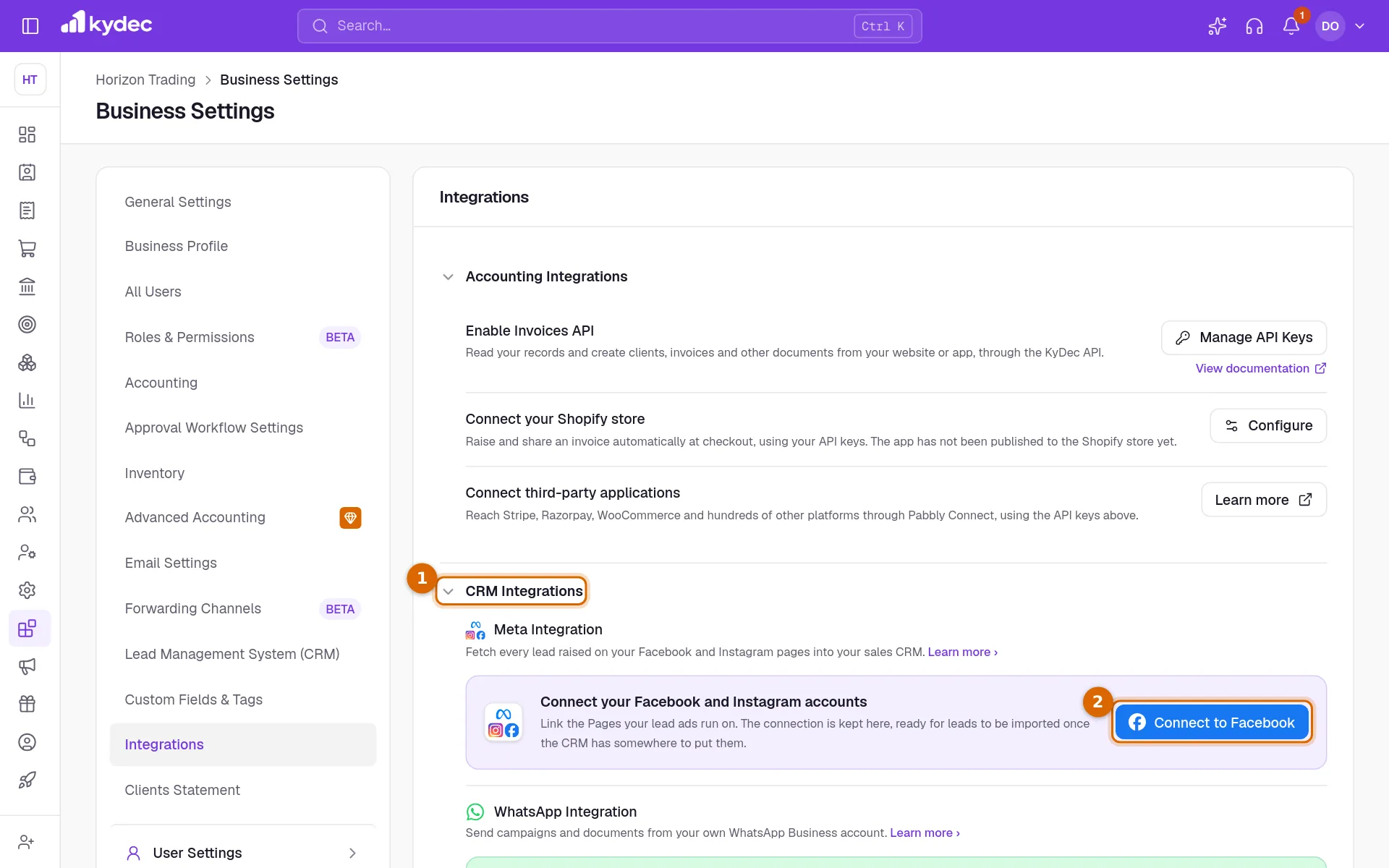
Where to find it:Business SettingsIntegrations
What connecting does today
The Meta connection links your Facebook Pages to this business. It is the first half of bringing leads from Facebook and Instagram into Sales CRM & Leads.
Today it stops at connected. KyDec checks your token, finds the Pages it can see and keeps the connection ready. Leads are not brought in yet.
- Available now: connect, see which Pages were found, refresh the list, and disconnect.
- Not available yet: leads from Facebook and Instagram do not arrive in your CRM, whether from a lead form or from a message. A business that is already connected will not have to set anything up again when they do.
- Until then, add leads yourself under All Leads in Sales CRM & Leads, or collect them with Forms on your website.
What you need first
- A role that includes Edit business profile.
- A Meta access token from a Facebook account that manages your Pages, with the permissions pages_show_list and leads_retrieval granted.
- If you have never made a token, See how to get a token in the connect dialog opens Meta's own guide.
Find the Meta connection
- 1Open Business Settings, choose the Integrations tab, and click CRM Integrations to open the section.
- 2Under Meta Integration, click Connect to Facebook.
Paste your token and connect
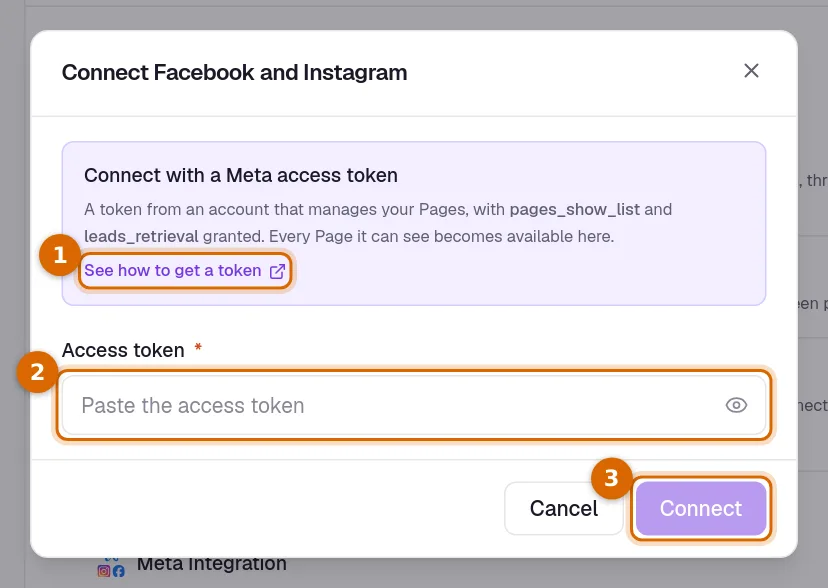
- 1See how to get a token opens Meta's guide in a new tab, if you still need a token.
- 2Paste the token into Access token.
- 3Click Connect. KyDec asks Meta which Pages the token can see and tells you how many it found.
Good to know. If the token cannot see a single Page, nothing is saved and you are told so. Check that the token comes from an account that manages the Page, then try again.
After you are connected
- The card shows how many Pages were found and their names.
- Sync pages reads the list again. Use it after you add a Page on Facebook.
- Disconnect removes the connection and the stored token from KyDec. You can connect again at any time.
- KyDec only reads the list of your Pages. It does not post to them or change anything on Facebook.
Common questions
- I am connected. Why are no leads arriving?
- Bringing leads in from Facebook and Instagram is not available yet. Connecting only links your Pages for now. Add leads under All Leads, or collect them with Forms, until it is.
- Do I connect Instagram separately?
- No. There is one connection. An Instagram business account attached to a Facebook Page is read together with that Page.
- Who can connect or disconnect?
- Anyone whose role includes Edit business profile.
Related guides
Streamline Lead Management
Automate lead capture with Forms & third-party integrations, manage leads across multiple pipelines, communicate over email/WhatsApp, track deal progress, track team performance, and more.
Forms
Lead capture, contact us, survey and all types of forms. Add them to your website, ads, or social media profile. Automatically capture all the data directly on KyDec.
Duplicate leads
We check a new lead against the ones you already have and flag a likely match, so two people do not end up working the same enquiry.
WhatsApp Business
Send quotations, invoices and campaigns from your own WhatsApp Business number, so clients see your business rather than an unknown sender.